How to Make a Page Easier for AI Crawlers to Read
Last updated: November 19, 2026
Quick answer: 7 fixes make a page easier for AI crawlers to read: serve the main content in HTML, keep JavaScript as enhancement, unblock render files, use clear headings and alt text, and test the rendered page. AI crawler readability means a crawler can fetch your page, render the important content, and understand it without fighting broken markup, blocked resources, or hidden text. If you want Googlebot, Bingbot, and newer AI systems to read the page, start by making the HTML, rendered content, and crawl paths boringly simple. This article is about how to make a page easier for AI crawlers to read.
Key takeaways
- Give crawlers a plain HTML path to the main content first.
- Keep JavaScript from being the only place your text exists.
- Remove crawl blockers before you polish anything else.
- Treat alt text, headings, and page speed as accessibility issues, but consult a professional for site-specific guidance.
- Test the rendered page, not just the source code.
- If a page is meant to hide content from bots, this guide is the wrong fit.
Start with the question AI crawlers are actually asking
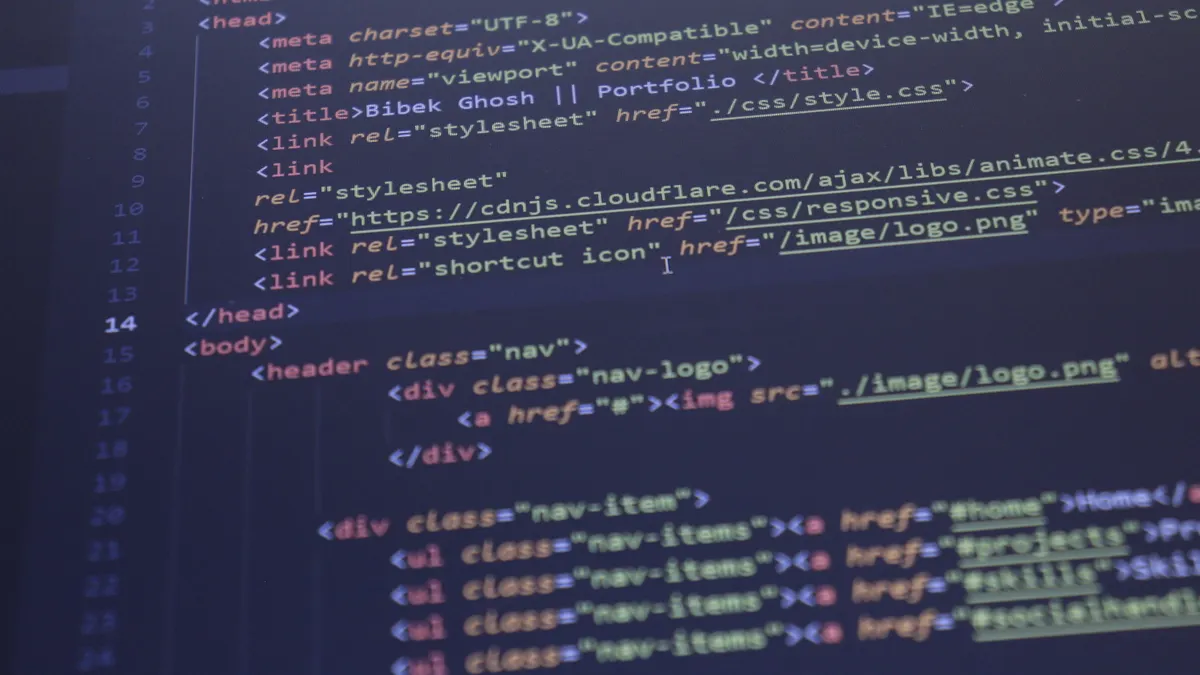
The question is simple: can the crawler fetch, render, and extract the page’s main content without extra work? That is what AI crawler readability comes down to. A page can look fine in a browser and still be hard for a crawler to process if the text is buried in scripts, loaded late, or blocked by robots.txt.
The first thing needed is a page that serves usable HTML at the URL itself. If the opening text, product details, article body, or key instructions are already present in the HTML response, crawlers have something to work with before any JavaScript runs. If the page depends on client-side rendering to assemble the content, the crawler has to do more work and may miss parts of the page entirely.
That is why this topic is not mainly about ranking tricks. It is about making the page legible to systems that may render differently from a person’s browser. Googlebot and Bingbot both crawl at scale, and both are better off when the page is not a maze of delayed scripts, blocked files, or empty shells. A reader who wants AI systems to understand the page should think like a parser first and a designer second.
The page is easier to read when the main content is visible in the raw HTML or very close to it. It is harder when the content appears only after a 2-second JavaScript fetch, inside a carousel, or behind interactions that a crawler may not trigger. That trade-off matters because the page can still be beautiful and fast for people while being opaque to machines. The goal is not to remove interactivity. The goal is to reduce the work a crawler needs for basic text.
For background on the broader strategy, the hub on AI search visibility belongs nearby. This page stays focused on crawl and render readability, not schema, citations, or link strategy.
How do I make a page easier for AI crawlers to read?
Make the page easy to crawl by putting core content in HTML, reducing render obstacles, and confirming that the rendered page matches the source. The procedure below works from the top down, because blockers at the door matter more than polish inside the room.
-
Check the live HTML response first, not the browser view.
Open the page source or fetch the URL with a crawler-style request and look for the main heading, lead copy, and key body text in the initial HTML. If the content is present before scripts run, the page already gives crawlers a clean start. -
Move primary text out of JavaScript-only containers.
Put article copy, product descriptions, and critical instructions in server-rendered HTML or in markup that exists immediately on load. If a crawler sees only a shell plus script calls, the page becomes harder to extract and slower to understand. -
Unblock the files the renderer needs.
Make sure robots.txt is not blocking CSS, JavaScript, or image assets needed to render the page correctly. If a crawler cannot load the files that shape the visible page, it may misread layout, hide content, or fail to assemble the main section. -
Simplify the DOM structure around the main content.
Use a clear heading hierarchy, fewer nested divs, and one obvious main content area. If the page uses 8 layers of wrappers around a paragraph, the crawler still may get there, but it has to work harder to identify what matters. -
Keep critical links and text in plain anchor and text elements.
Navigation, in-page links, and important labels should be normal HTML, not only button text drawn by scripts. Crawlers read links more reliably when they are standard anchors with visible text. -
Add descriptive alt text where the image carries meaning.
If an image explains a process, a chart, or a product detail, the alt text should say what the image shows in plain language. Decorative images can stay empty. If a crawler can only see the image but not the meaning, that part of the page becomes less useful. -
Measure whether the rendered output matches the source.
Compare the rendered page after scripts run with the original HTML and look for missing headings, truncated copy, or collapsed sections. When the two versions match on the important parts, the page is far easier for AI crawlers to read.
This is the core job. If one of these steps fails, the page is not really crawler-friendly yet, no matter how polished the design feels to a human.
What blocks AI crawlers from reading a page?

The biggest blockers are hidden content, render delays, blocked resources, and messy structure. Those are the things that turn a page from readable into fragile.
JavaScript rendering is the most common trap. A page can rely on client-side rendering and still look fine to a user with a modern browser, but crawlers may need a second pass to see the final content. That adds failure points. If the important text is built only after a script runs, the crawler can miss it, mis-sequence it, or spend too much budget getting to it. A page that depends on a 3-step app shell is harder to read than one that ships the content directly.
Robots.txt can also create trouble. If it blocks CSS or JavaScript files that the page needs for rendering, the crawler sees a damaged version of the page. That is not just a technical detail; it changes what the system thinks the page contains. A blocked image folder can also prevent alt text and surrounding context from being interpreted well when visuals matter.
Another common blocker is content that is visually present but structurally hidden. Tabs, accordions, modals, and infinite scroll can work, but they need careful implementation. If the page hides the only copy of a key answer inside a collapsed panel and the HTML does not expose it, crawlers have less to read. If the same content appears in HTML and then gets enhanced by script, the risk is lower.
Poor HTML also gets in the way. A page with skipped heading levels, duplicate IDs, or layout markup used as content markup makes extraction less reliable. A crawler does not need perfect code, but it does need consistent signals. The cleaner the HTML, the easier the parsing.
This is where a generic SEO checklist usually gets lazy. It says “make content useful” and stops there. For AI crawler readability, the issue is not usefulness alone. It is whether the machine can actually fetch the useful part without guessing.
Keep rendered content visible without making the page brittle
Keep rendered content available in a form that survives JavaScript failure and slow network conditions. That means the page should still make sense if the script bundle is delayed by 1 to 2 seconds or does not execute as expected.
Use progressive enhancement: deliver the essential content in HTML, then let JavaScript improve the experience after load. A human can still get tabs, filters, animations, and interactive widgets. The crawler gets the core page immediately. Not every crawler renders the same way, and not every rendering pass is guaranteed to finish.
Avoid hiding core copy behind clicks that reveal nothing in the HTML. A button that expands an FAQ is fine if the answer text is already there or is accessible without brittle script logic. A button that fetches the answer only after interaction is riskier. The same is true for lazy-loaded sections below the fold. Lazy loading can help page speed, but if it delays the only copy of critical text, it can hurt readability.
Keep the order of the rendered content stable too. Crawlers care about what comes first, what comes second, and what gets repeated. If the page injects sidebars, promotional banners, or related items before the main body in the DOM, the extraction signal gets noisier. A 900-word article should not be buried under 2 carousels and a subscription wall.
This is also where page speed basics matter. Faster pages are easier to crawl because the renderer spends less time waiting for assets. Reduce oversized JavaScript bundles, compress images, and avoid loading unnecessary third-party scripts on every page. A page that takes less work to render is usually easier to read, even when the content itself has not changed. Google’s own guidance on Core Web Vitals ties page experience to measurable performance signals, including Largest Contentful Paint under 2.5 seconds, Interaction to Next Paint under 200 milliseconds, and Cumulative Layout Shift under 0.1. (Source: Google Search Central)
The trade-off is obvious: some dynamic features make the site nicer for people but harder for crawlers. That is not a reason to ban JavaScript. It is a reason to reserve JavaScript for enhancement, not for the only copy of essential text.
Clean HTML, alt text, and accessibility cues that help machines
Clean HTML, descriptive alt text, and accessible structure give AI crawlers clearer signals about what each part of the page means. This is the easiest part to overlook because it feels like a design detail, not a crawl issue.
Use one clear H1, then logical H2s and H3s. The heading order is not decoration; it is a map. If the page jumps from H1 to H4 because the stylesheet likes the look of it, the structure becomes harder to read. Keep paragraphs in paragraph tags, lists in list tags, and links in anchor tags. The HTML should match the content’s purpose, not just its visual shape.
Alt text matters when the image contributes meaning. A diagram, product photo, screenshot, or step illustration should carry text that describes what the image shows and why it is there. “Image123” tells a crawler nothing. “Screenshot of the settings panel showing crawl permissions” tells it a lot more. Decorative imagery can be left empty so the system does not waste time treating it as content. For implementation details, consult a web accessibility specialist and review the W3C guidance on alternative text. W3C WAI
Accessibility cues help because they line up with machine readability. Clear labels, descriptive link text, and visible form field names reduce ambiguity. A link that says “Read the setup guide” is easier to interpret than “Click here.” The same logic applies to buttons and icons. If the page relies on icon-only controls, add text labels so the role of each element is obvious.
This is not the place for schema markup. Schema is a separate topic and belongs on a different page. Here, the point is the surface structure of the page itself. The cleaner that surface is, the less a crawler has to infer.
A page with good accessibility often ends up easier for AI systems to read for the same reason it is easier for screen readers to handle: the content is expressed clearly, not implied through visual styling alone.
How do I test crawler accessibility without guessing?
Test crawler accessibility by comparing the fetched HTML, the rendered page, and what a crawler can actually see. That is the only way to know whether the page is readable in practice, not just in theory.
Start with a fetch of the URL and inspect the response source. If the key content is absent there, the page is already at risk. Then render the page in a tool or browser environment that mimics search crawler behavior and compare what changed. Missing paragraphs, empty containers, or delayed headings are red flags. If the rendered page shows the content only after a long script chain, that is a clue that the crawler experience is fragile.
Check robots.txt too. The file should allow the crawler access to the resources needed for rendering, unless there is a deliberate reason to block them. A blocked CSS file can make the page look like a bare document to the crawler. A blocked script can remove content entirely. That is especially important on pages with interactive modules.
Use a simple content checklist while reviewing the rendered result: title, H1, opening paragraph, main body, image alt text, and navigation links. If any of those are missing or distorted, the page needs work. The test is not whether the page looks acceptable in a browser tab. The test is whether the important content survives the crawl and render path intact.
This is where many teams stop too early. They check that the homepage loads and assume every page is equally fine. It is better to inspect a representative content page, a JavaScript-heavy page, and a page with images or video. The weak page tells you more than the easy one.
Do not chase a perfect score. The goal is a page that stays legible when the crawler uses a slightly different rendering path, a slower connection, or a narrower set of resources. If the page still communicates its main content under those conditions, it is in good shape.
What do ai crawlers struggle to read?
AI crawlers struggle most with content that is hidden behind scripts, loaded late, or blocked from rendering. They also have a harder time with messy HTML, weak heading structure, and images without useful alt text. If the page depends on interaction to reveal the only copy of important content, readability drops fast.
How do i test crawler accessibility?
Test crawler accessibility by comparing the raw HTML with the rendered page and checking whether the main content appears in both. Review robots.txt, confirm that CSS and JavaScript are accessible, and inspect the page with a crawler-style fetch or rendering tool. If the important text disappears in the rendered version, the page still needs work.
Does javascript hurt ai visibility?
JavaScript does not automatically hurt AI visibility, but JavaScript-only content does. If the page ships its main text in HTML and uses JavaScript for enhancement, it can still be easy to read. If the page requires scripts to reveal or assemble the core content, crawlers have more chances to miss it or read it slowly.
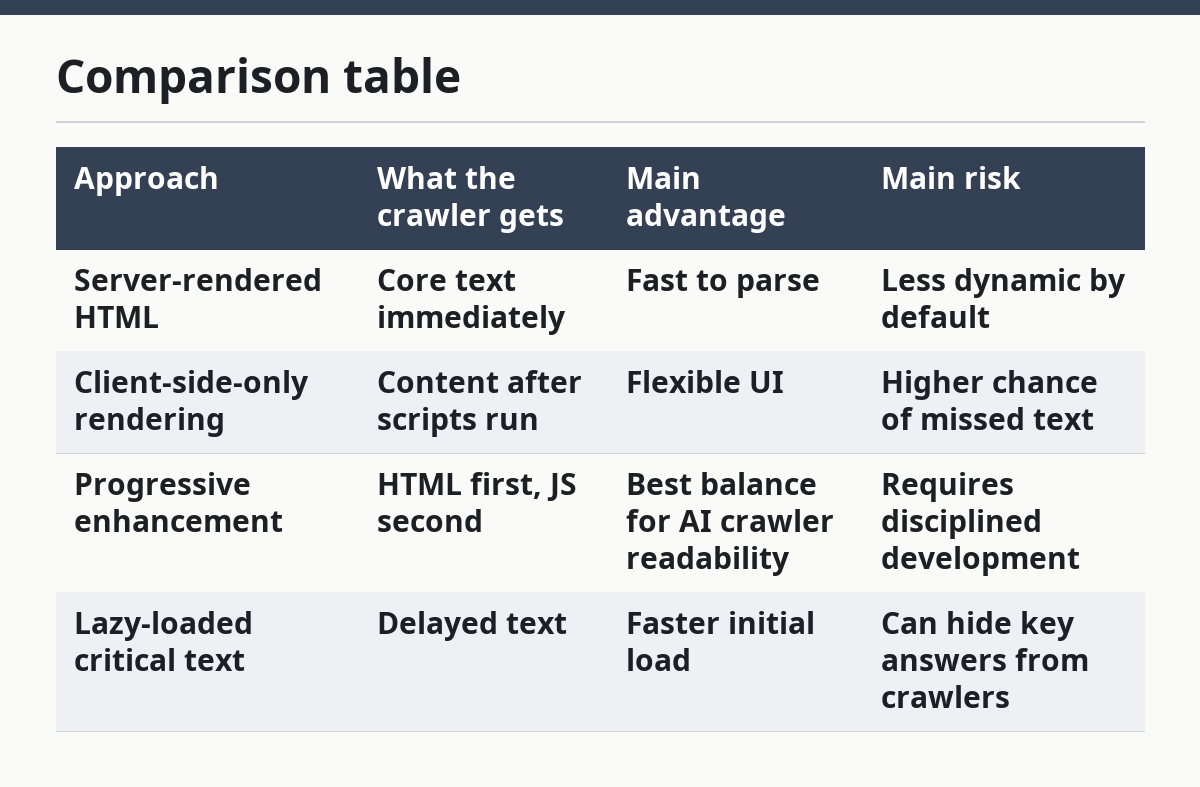
Comparison table
| Approach | What the crawler gets | Main advantage | Main risk |
|---|---|---|---|
| Server-rendered HTML | Core text immediately | Fast to parse | Less dynamic by default |
| Client-side-only rendering | Content after scripts run | Flexible UI | Higher chance of missed text |
| Progressive enhancement | HTML first, JS second | Best balance for AI crawler readability | Requires disciplined development |
| Lazy-loaded critical text | Delayed text | Faster initial load | Can hide key answers from crawlers |
Related pages
- AI search visibility hub
- Robots.txt guide
- Core Web Vitals guide
- HTML headings and structure
Drafted with AI; not yet reviewed by a person.