How to Choose Pages to Refresh Before New Content: related questions
Last updated: November 20, 2026
Quick Answer: refresh 1 page first—the one that already has search demand, topical overlap, or clear ranking potential. If a page can be improved in under 1 sitting and is already close to the topic you want to grow, it usually deserves the first pass.
Key takeaways
- Start with pages that already get impressions, clicks, or links; those are the easiest wins.
- Refresh the page that sits closest to the new topic, not the one that merely looks old.
- If a page needs a full rewrite, split it instead of forcing it to carry 2 jobs.
- Pages with thin intent match, stale facts, or missing related questions can be strong refresh candidates.
- A new article is not always the right next move if an existing page can absorb the search demand.
What should you refresh first?
Refresh the page that is closest to the new topic and already has some search value. If a page has impressions in Google Search Console, ranks on page 2 or 3, or has earned links, it is usually a better candidate than a dead page with no signals.
The easiest way to think about it is this: a refresh should save you more work than a new page would create. If the page already matches the search intent, then updating it is often faster than starting from zero. Google’s own guidance on helpful content and SEO points in the same direction: improve pages for people first, and keep the content clear, useful, and current. See Google Search Central’s SEO Starter Guide and Google’s guidance on creating helpful, reliable, people-first content.
- List the pages that touch the same topic as the new content.
- Check which ones already get impressions, clicks, or external links.
- Look at the search intent: informational, comparison, or problem-solving.
- Pick the page that is closest to the new topic and easiest to improve.
- Update that page first, then decide whether the new article still needs to exist.
If the page works only after a major rewrite, that is a warning sign, not a win. A page that needs 800 new words, a new structure, and a new angle may be better treated as a new article with a redirect or merge plan; if the topic affects medical, legal, or financial decisions, consult a qualified professional and use a source such as Google’s guidance on helpful content and people-first pages.
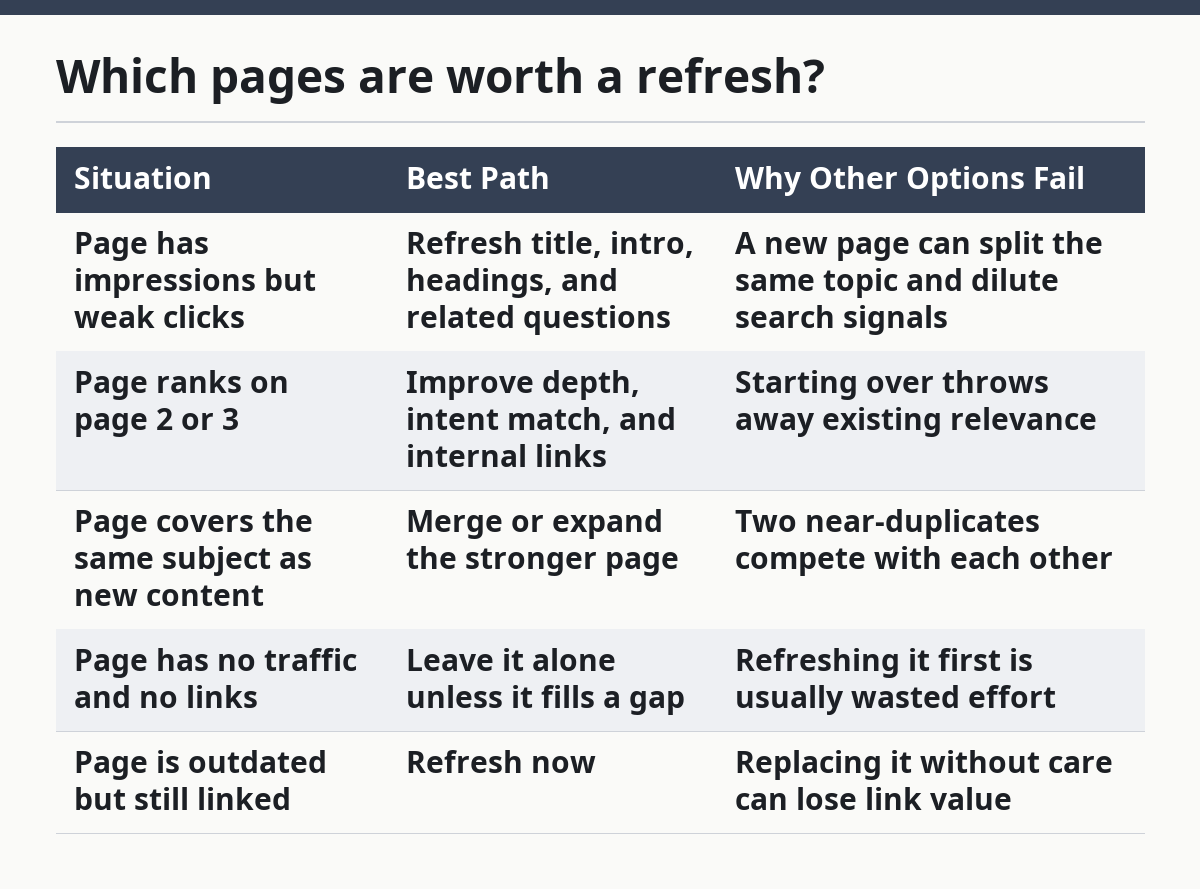
Which pages are worth a refresh?
Pages with traffic history, links, or close topic overlap are worth a refresh. Pages with no search demand and no clear role are usually not.
Use this quick filter before you touch anything. If a page already ranks for related questions, has been indexed for a while, or sits near a target keyword you want to grow, it belongs on the refresh list. If it has no impressions and no backlink profile, it usually does not deserve first priority just because it is older than the rest.
| Situation | Best Path | Why Other Options Fail |
|---|---|---|
| Page has impressions but weak clicks | Refresh title, intro, headings, and related questions | A new page can split the same topic and dilute search signals |
| Page ranks on page 2 or 3 | Improve depth, intent match, and internal links | Starting over throws away existing relevance |
| Page covers the same subject as new content | Merge or expand the stronger page | Two near-duplicates compete with each other |
| Page has no traffic and no links | Leave it alone unless it fills a gap | Refreshing it first is usually wasted effort |
| Page is outdated but still linked | Refresh now | Replacing it without care can lose link value |
A page with 0 useful signals is not automatically bad, but it is a poor use of time if other pages already sit closer to the finish line. The goal is not to refresh everything. The goal is to choose the page where 1 round of edits can change the result.
Quick check: if you had to choose one page to improve this week, would it already be partway to ranking?
How do related questions change the choice?
Related questions decide whether a page needs a refresh, a split, or a new article. If the current page already answers the main question but misses the follow-up questions readers actually ask, then refresh it. If the follow-up questions are a different intent, then create a separate page.
This is where many content plans go wrong. A page about “How to Choose Pages to Refresh Before New Content: related questions” can easily drift into “how to rewrite content,” “how to audit internal links,” and “how to measure SEO gains.” Those may belong on the same page only if they stay tightly connected. If they need separate steps, separate tools, or separate reader intent, they deserve separate pages.
Use this 5-step check:
- Write the main search question in plain language.
- List 3 to 7 related questions people ask after that first question.
- Mark which questions are answered by the current page and which are not.
- Decide whether the missing questions fit the same intent or a new one.
- Refresh the page only if the missing questions strengthen the same promise.
If the related questions all point to the same decision, add them. If they point to a different decision, stop. For example, “Which pages should I refresh first?” and “How do I rewrite a page without changing its URL?” can live together. “Should I delete thin content or noindex it?” usually needs its own page.
Quick check: do the related questions help one reader finish one job, or do they start a second job?
When should you refresh instead of publish new content?
Refresh instead of publishing new content when the topic already exists on your site in a weaker form. If the new idea is a close match to an existing page, the stronger move is often to improve that page rather than create a second version.
That said, not every old page deserves a second life. If the current page is too broad, targets the wrong intent, or cannot cover the topic without turning into a mess, then a new page makes more sense. The test is simple: can the old page be upgraded in a way that keeps the URL useful and the topic focused? If yes, refresh it. If no, build the new page and keep the old one from competing with it.
A good refresh candidate usually has at least one of these traits:
- It already matches the keyword family.
- It already has some indexation or links.
- It is close to the right answer but thin.
- It has stale examples, missing steps, or weak organization.
A bad refresh candidate usually has none of those traits. It may be a placeholder, a misfit, or a page that should not be in the index at all.
The trade-off is real: refreshing can save authority, but it can also hide a better structure under an older URL. New content is better when the topic deserves a cleaner frame.
Quick check: if the existing page were renamed and improved, would the searcher still recognize it as the right answer?
What does the decision process look like in practice?
The decision process should follow 5 to 7 checks, in order, so the answer does not depend on guesswork. Start with the easiest signal and end with intent fit.
- Gather all pages that overlap the topic.
- Check Search Console for impressions, clicks, and queries.
- Look for pages with page 2 or page 3 visibility.
- Compare the page’s current intent with the new content idea.
- Check whether the page already has links or mentions worth keeping.
- Decide whether the page needs a refresh, merge, split, or retirement.
- Only then decide whether new content is still needed.
A page with a little traction and the right intent often wins over a newer page with none. A page with the wrong structure, wrong angle, or weak question coverage may still be the right one to keep, but only after a major edit. If the page is short, stale, and off-topic, it is usually not a refresh candidate.
The best benchmark here is not word count alone; it is whether the page can become the clearest answer on the site for that topic without confusing the rest of the content map.
Quick check: can you explain why this page deserves editing in one sentence, without saying “because it’s old”?
What if the page is old but still useful?
An old page should be refreshed if it still pulls demand or supports other pages. Age alone is not the reason to refresh; usefulness is.
This is where a lot of generic advice falls apart. Some pages are old because they are neglected. Others are old because they are stable, linked, and still relevant. A 3-year-old guide with useful backlinks and steady impressions is often more valuable than a 3-month-old page with no signals. The date on the page matters less than the role it plays in the topic cluster.
Use a refresh when the page has one or more of these problems:
- Facts or examples are stale.
- The headings no longer match search intent.
- A newer page has cannibalized its queries.
- The page answers the main question but misses the related questions.
Do not refresh it just to “keep things fresh.” That phrase hides bad priorities. If the page already performs, change only what affects searcher satisfaction.
Quick check: is the page old because it is outdated, or old because it has earned a place?
What should you not refresh?
Do not refresh pages that have no search role, no link value, and no close match to the topic you want to grow. Those pages are usually better left alone, merged, or removed.
A common mistake is spending 2 hours updating a page that will never rank for the query family you care about. Another is refreshing every thin page before new content, which turns a focused content plan into busywork. If a page is missing the wrong things, a refresh will not fix the wrong page.
Here are 4 edge cases where normal advice breaks down:
-
Situation: the page ranks, but for the wrong query.
What changes: the page has visibility, but it attracts the wrong intent.
What to do instead: tighten the angle or split the page so the wrong traffic does not keep pulling it off-topic. -
Situation: the page has strong links, but weak content.
What changes: authority exists, but the answer is thin.
What to do instead: refresh the page in place and protect the URL, because the links are carrying value. -
Situation: two pages cover the same topic at different depths.
What changes: cannibalization becomes the main problem.
What to do instead: choose one primary page, merge the useful parts, and let the weaker page stop competing. -
Situation: the page is evergreen, but the examples are dated.
What changes: the core idea stays good, but details look stale.
What to do instead: update the examples, dates, and screenshots without changing the page’s central promise. -
Situation: the page is short because the query is narrow.
What changes: length is not the issue.
What to do instead: keep it short if it already answers the query cleanly; do not pad it to look “more complete.”
Quick check: does the page fail because it is weak, or because it is being asked to do the wrong job?
FAQ
How do I know a page is close enough to refresh?
A page is close enough when the topic, intent, and main question already match the new content idea. If you can improve the page with targeted edits instead of a total rebuild, it is a good refresh candidate.
Should I refresh pages with no traffic?
Usually no. A page with no impressions, no links, and no role in the topic map is not the best first use of time. Refresh it only if it fills an important gap or supports a larger page set.
What if the related questions are bigger than the page?
Then the page is probably too narrow for the job. Keep the strongest core page and move the larger related questions into separate articles instead of forcing one URL to answer everything.
Is it better to refresh before every new article?
No. Refresh first only when the old page is already part of the same topic and has a real chance to win. If the new idea is truly separate, publish the new page and leave the older one alone.
Drafted with AI; not yet reviewed by a person.