
How to Use Headings to Separate Questions on a Page
Last updated: November 19, 2026
Quick Answer: use 1 heading for 1 question, and keep most pages to 3–6 H2s unless the article genuinely needs more distinct answers. How to use headings to separate questions on a page is really about giving each question its own place so readers can move from one answer to the next without guessing. Use heading structure, page outline, content sections, and search intent to keep each question in its own place.
If you’re unsure whether your headings are clear enough, consult a qualified content strategist or accessibility specialist; MDN’s heading element reference and the W3C’s WCAG guidance on headings both treat heading structure as meaning, not decoration.
Key takeaways
- Put each question under its own heading so the page outline stays clean.
- Use H2 for the main question, then H3 for smaller questions under it.
- Keep each section focused on one answer, not three or four mixed together.
- If two headings could be swapped without changing the meaning, the page is too loose.
- A strong outline makes long pages easier to scan on a phone in a few seconds.
How do I separate one question from the next with headings?
Separate one question from the next by giving each question its own H2 and keeping the answer under that heading only. That is the simplest rule, and it works for most pages that are meant to answer multiple questions in one article.
If the page has a main topic plus several related questions, use H2 for each big question and H3 for the smaller questions inside one H2. That keeps the page outline clear in HTML and easy to scan by eye. A reader should be able to glance down the page and see where one answer ends and the next begins.
Here is the basic pattern:
- Write the question as the H2. Keep it to one idea, such as “How do I separate questions on a page?”
- Put the answer in the first sentence. The reader should know the point before the second sentence.
- Use H3 only for subquestions. If a question needs a side point, nest it instead of giving it a new H2.
- Keep the section narrow. If the answer needs 3 separate ideas, split them into 3 sections.
- Check the page outline. Read only the headings. If the sequence still makes sense, the structure is doing its job.
That pattern is close to how HTML heading tags are meant to work. The tags from <h1> through <h6> form a hierarchy, and that hierarchy should match the page outline instead of the visual style alone. MDN’s heading element reference and W3C’s WCAG guidance on headings both treat structure as meaning, not decoration. If the outline is unclear, consult a professional before you publish.
This is the right approach for a learning page, a help article, or a question-led guide. It is not the right approach for a page where every question is tiny and only needs one short sentence. In that case, too many headings can make the page feel chopped up.
What makes one heading different from the next?
One heading is different from the next when it carries one distinct job and the next heading answers a different question or moves to a different part of the process. If the two headings could be merged into one sentence without losing meaning, they probably do not need to be separate.
The easiest test is this: read the heading aloud and ask, “Would a reader expect a new answer here?” If the answer is no, the heading is too close to the one above it. A section that starts with “How do I choose H2s?” and the next that starts with “How do I write them?” may belong together if the page only has 2 or 3 short points.
A clean page outline usually separates questions by type:
- Main task question: what the reader wants to do
- Process question: how to do it
- Rule question: what structure to use
- Mistake question: what goes wrong
- Check question: how to know it is working
That split keeps content sections from stepping on each other. It also helps search intent stay focused, because each heading signals a new answer instead of a new version of the same answer.
A generic article often gets this wrong by making every heading sound polished and abstract. That creates headings like “Best practices” or “Strategic considerations,” which hide the real question. Concrete headings beat vague ones because readers can tell, in 2 seconds, what each section gives them.
Which heading level should I use for each question?
Use H2 for each main question and H3 for the smaller questions underneath it, because that hierarchy gives the page a readable outline without flattening everything into one level. On a normal article page, H2 does the heavy lifting and H3 handles the detail.
A practical rule helps here: if the answer could stand as its own section on a phone screen, make it an H2. If it only makes sense as part of the answer above it, make it an H3. That keeps the page from turning into a stack of nearly equal headings.
Use this comparison to decide fast:
| Heading level | Use it for | Good fit | Bad fit |
|---|---|---|---|
| H2 | One full question or major step | “How do I separate questions on a page?” | A tiny note that belongs inside another answer |
| H3 | A subquestion under one H2 | “When should I use H3 instead?” | A new main topic |
| H4 | Rare detail inside an H3 | A narrow edge case | A normal section on a short article |
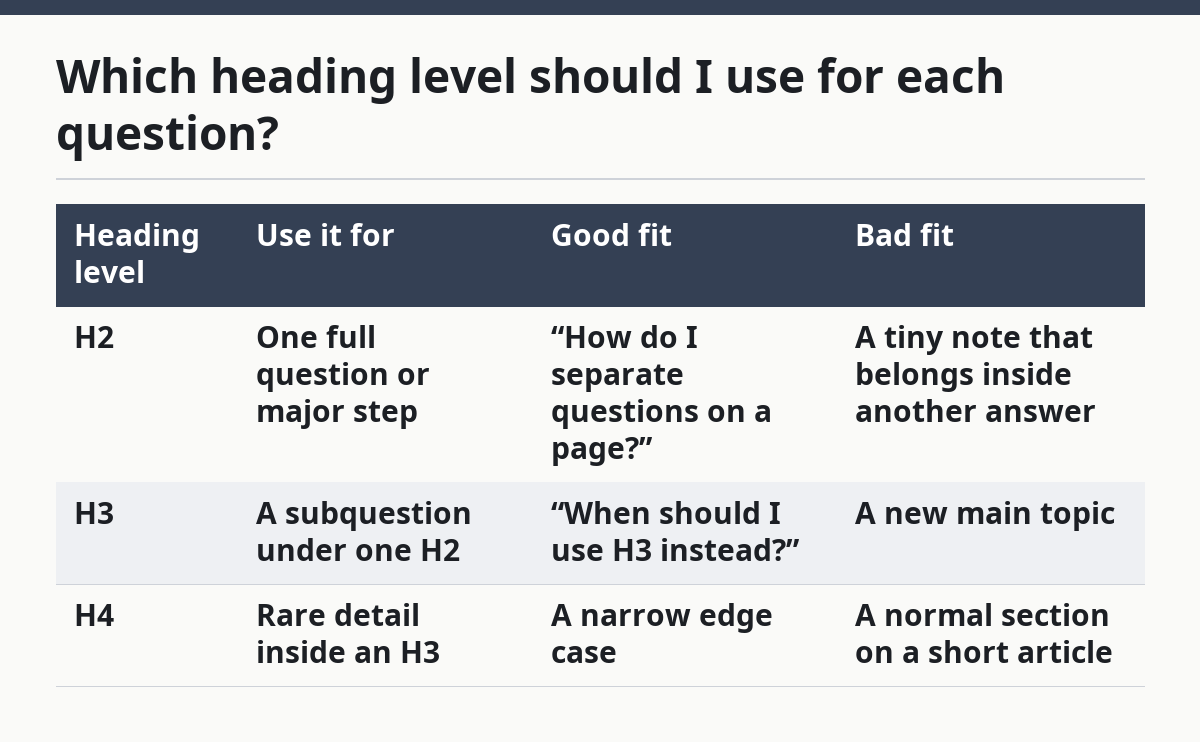
The H2 and H3 split is enough for most pages. H4 is usually overkill unless the article is long and technical. If you need H4 just to explain the page, the outline is probably too dense and should be broken into separate sections instead.
This matters more than it looks, because the level tells readers how the page is built. A heading tag is not just a label; it is part of the document structure. That is why heading structure, page outline, and content sections should line up instead of fighting each other.
How do I keep questions from overlapping?
Keep questions from overlapping by giving each heading a single answer lane and cutting any sentence that starts to solve a second problem. Overlap happens when a section begins with one question and drifts into another without a clean stop.
The fix is simple, but it takes discipline. If a heading asks about one thing and the next paragraph starts answering a different thing, move that paragraph to the right section. Do not leave it where it is just because the transition sounds smooth. Smooth prose can still make a weak outline.
A strong page has clear boundaries. Each section should answer:
- what the question is
- what the reader should do next
- what belongs in another section
That last point is where overlap usually shows up. For example, a section on question headings should not also teach a full SEO rewrite process. That belongs to a different page in the cluster, especially when the site already has a separate URL for heading structure for SEO readability and relevance, AI content structure for AI search, and related refresh work. Keeping this page narrow stops two pages from competing for the same job.
There is a trade-off here. Short sections are easier to scan, but if you cut them too hard, they become thin and repetitive. Long sections can explain more, but they often bury the next question. A good target is one idea per section, with enough detail to answer it fully in a single read.
What should a page outline look like?
A page outline should move from the main question to the smaller questions in a clean order, with no jump back and forth between levels. If you read only the headings, the path should still feel logical.
A simple outline for this topic looks like this:
- Main question: how to separate one question from the next
- Structure question: which heading level to use
- Clarity question: how to keep headings distinct
- Error question: what goes wrong when headings overlap
- Check question: how to review the final page
That order works because it matches how a reader thinks. First they want the rule. Then they want the structure. Then they want the common mistakes and a final check. If the page jumps from mistakes to definitions and back again, the outline loses shape.
This is also where search intent matters. A learning page should teach one process, not wander into a pile of loosely related advice. If the headings are separate enough that each one can be quoted on its own, the outline is probably healthy. If every heading sounds like a version of the same sentence, the page needs a rewrite.
One useful check is to look at the first sentence under each heading. If that sentence does not answer the heading directly, the section is likely doing too much. That is a sign the page outline and the content sections are out of sync.
What should I avoid when separating questions?
Avoid vague headings, mixed questions, and sections that answer two problems at once, because each one makes the page harder to read in under 10 seconds. The reader should not have to guess whether a heading is a rule, a step, or an example.
The most common mistake is using headings that sound broad but say very little. “Organization” or “Improving the page” does not tell the reader what question is being answered. A heading like “How do I use H3 under one H2?” does.
Another mistake is stacking too many H2s when the page only needs a few. That creates a page outline that looks neat but feels thin. On the other hand, using only one H2 for a long page forces every question into the same box and makes scanning harder. The right balance depends on how many distinct questions the page truly has, not on how many headings the template can hold.
This is where a standard helps. If a page can be explained cleanly with H2 for the main questions and H3 for the nested ones, that is usually enough. You do not need to force a deeper hierarchy just to look organized. The goal is not more tags; the goal is a page that reads like a set of separate answers.
That makes this approach wrong for pages where the questions are already separate articles. If one question needs a long answer of its own, it may deserve its own page instead of a heading inside a larger article. A heading is not a substitute for scope.
How do I check the final page?
Check the final page by reading the headings in order, then reading only the first sentence under each one. If both layers make sense on their own, the page separates questions well.
Use this quick review:
- Headings only: does the outline still tell the story?
- Headings plus first sentences: does each section answer its own question?
- H2/H3 mix: are nested questions under the right parent?
- Final pass: does any heading repeat the same job as another heading?
If two headings can be swapped without changing the page, the structure is too loose. If a heading needs three paragraphs before it starts answering, the section is carrying too much. Fix the structure before you polish the wording.
This is the best place to catch overlap from a rewrite or an AI draft. Many drafts sound fluent while the section boundaries stay muddy. A quick outline read catches that problem faster than line editing does. It also keeps the page aligned with the site’s AI content structure for AI search work, where clear section roles matter more than ornamental phrasing.
The clean result is simple: one heading, one question, one answer path. That is what helps a reader stay on the page and find the next answer without hunting for it.
How many H2s should a page have?
A page should have as many H2s as it needs to separate the real questions, and no more. If the page has 3 distinct questions, 3 H2s may be enough; if it has 6, it may need 6. The better test is whether each H2 earns its own answer instead of repeating the one above it.
Should headings be questions or statements?
Headings can be either questions or statements, but question headings work better when the page is built around reader intent. A question heading matches how a person searches and makes the first sentence easier to aim. Statement headings are fine when the section name is naturally a topic label, not a direct question.
How do I stop headings from overlapping?
Stop headings from overlapping by giving each one a different job and moving any stray sentence to the section where it belongs. If one heading starts answering another heading’s question, the outline is leaking. A 2-minute outline read usually shows the overlap before the page goes live.
Drafted with AI; not yet reviewed by a person.