Build a Repeatable AI Refresh Workflow for Legacy SEO Content
Last updated: November 19, 2026
Key Takeaways
- A repeatable AI refresh workflow is a fixed process for picking old pages, updating them with AI tools, and publishing through the same editorial steps.
- Pick pages with real demand, clear gaps, and enough room to improve in one pass.
- A legacy content workflow follows five steps: intake, brief, AI draft, human review, and versioned publish.
- Use AI writing tools to speed up drafting, not to decide what the page should say.
Legacy SEO content needs a repeatable AI refresh workflow when old pages still get impressions but have slipped in rankings, accuracy, or usefulness. This guide on how to build a repeatable AI refresh workflow for legacy SEO content shows how to turn one-off fixes into a legacy content workflow that you can run from Google Search Console, a content calendar, and your editorial workflow without guessing. For context on how search engines evaluate helpful, reliable content, see Google’s guidance on creating people-first content and quality updates. (Source: Google Search Central Google Search Central)
This guide settles the stages, roles, review steps, and version control that make refreshes keep working.
What a repeatable AI refresh workflow actually is
A repeatable AI refresh workflow is a fixed process for choosing old pages, updating them with AI writing tools, and shipping the changes through the same editorial workflow every time. It is not “rewrite whatever looks stale.”
Picture this: you have 200 legacy pages, one content calendar, and only a few hours each week. You need a process that tells you which pages to refresh, who touches them, and what proof says the update is done. That is the real job.
The workflow matters because legacy pages fail in different ways. Some need a new intro. Some need a clearer structure. Some have outdated dates, broken claims, or thin sections that no longer match search intent. If you treat them all the same, you can waste time and, if needed, you should consult a professional editor or SEO lead before making broad edits. For one practical reference point, Google says useful content should be made for people and reviewed for accuracy. (Source: Google Search Central)
A good workflow has 4 fixed parts: selection, update, review, and release. It also has a version trail so you can see what changed in draft, what was approved, and what went live. Without that, AI saves time once and creates chaos later.
Use it for pages that already have some value in Google Search Console, not for pages that should be merged, deleted, or rebuilt from scratch. That line saves more time than any prompt.
What it should produce
A working refresh flow should give you:
- a short list of pages worth updating
- a standard brief for each page
- a draft that follows your house rules
- a final approval step before publish
- a record of what changed and why
That list is the backbone. Everything else hangs off it.
How do you choose legacy pages worth refreshing?
Choose pages with signs of existing demand, clear gaps, and enough room to improve in one pass. That usually means looking at Google Search Console for pages with impressions, then checking whether the page is losing clicks, missing intent, or carrying old information.
Picture this: you open Search Console and see a page still getting impressions for a topic you cover. The page is not dead, but it no longer answers the query as well as newer results. That is the kind of page this workflow is built for.
Use a simple triage rule before any AI draft starts. Pages that already attract search demand are the easiest wins. Pages with no impressions, no links, and no business value are usually poor refresh candidates. Pages with a strong backlink profile but weak on-page structure may be worth a careful update even if traffic is flat.
A repeatable system needs a refresh checklist at this stage. Keep it short enough that a junior editor can use it in 10 minutes. Then score each page the same way every month. For the underlying measurement, Search Console reports performance data by page and query, which makes it the right starting point for this selection step. (Source: Google Search Console Help)
Refresh checklist for page selection
- Check Google Search Console for impressions, clicks, and query changes over the last 28 days.
- Compare the page title and H1 with the main query it now ranks for.
- Look for obvious date, pricing, or process drift.
- Scan the page against the current top result structure.
- Decide whether the page needs a refresh, a merge, or no action.
The best part is that this stops you from refreshing pages that should be cut. Not every old URL deserves a second life.
What does the legacy content workflow look like?
A legacy content workflow is a five-step path: intake, brief, AI draft, human review, and publish with version control. That structure keeps the refresh process repeatable even when different editors handle different pages.
Picture this: your editor opens a brief that already says what to keep, what to change, and what the page must accomplish. The page is not starting from a blank screen, and nobody is reinventing the process at 4 p.m. on Friday. That is the point.
Here is a practical version of the workflow. It uses the same order every time, so the output is easier to trust.
- Intake the page. Log the URL, current target query, last update date, and the reason it is being refreshed. Use a spreadsheet or task card, not a loose note in chat. The result is a single source of truth for the page.
- Write a refresh brief. Add the section changes, missing angles, must-keep claims, and any internal link targets. Keep it to one page. That limits scope creep.
- Run the AI draft. Use your preferred AI writing tools to rewrite the parts the brief calls out. Ask for a structure that matches the current search result pattern, not a generic blog template.
- Edit by rule, not mood. Check the draft against a fixed checklist for accuracy, search intent, tone, and internal links. This is where the human editor earns the keep.
- Publish with a version note. Record the date, the editor, the main changes, and the reason the update shipped. If the page underperforms later, you can trace the change.
Every stage needs an owner. One person can write the brief, another can edit the draft, and a third can approve the final page. If the same person does all three on every page, the workflow gets fast but brittle.
Roles that keep the workflow clean
- SEO lead: chooses the page and sets the target query
- Content editor: writes the brief and checks structure
- Writer or AI operator: produces the first draft
- Final reviewer: signs off before publish
A workflow with no named owner becomes a queue. A queue is not a process.
How do you use AI writing tools without turning refreshes sloppy?
Use AI writing tools to speed up drafting, not to decide what the page should say. The prompt should control the shape of the update, while the editor controls the facts, tone, and final fit.
Picture this: you feed the model a brief that names the target query, the outdated section, and the source notes. The draft comes back faster than a manual rewrite, but it still needs a human to catch drift, repetition, and weak claims. That is normal.
The safest practical pattern is to use AI for narrow tasks. Ask it to propose a new outline, tighten a weak section, or rewrite a meta description. Don’t ask it to “refresh the whole page” and hope it respects your site standards. That request is too loose for legacy pages that already rank for specific terms.
The prompt should include the page goal, audience, tone, sections to preserve, and any facts that must remain unchanged. It should also say what the model must not do, such as invent new features or strip out examples. The tighter the input, the cleaner the draft.
Prompt inputs that keep the draft on rails
- current URL and target query
- section list to keep, cut, or rewrite
- source notes from the existing page
- brand voice rules
- forbidden claims or outdated details
- links that must stay in place
The trade-off is simple: narrower prompts take more setup time, but they save much more time during edit. Broad prompts feel faster for 5 minutes. They cost you hours later.
What should the review steps catch before publish?
The review steps should catch factual drift, search-intent mismatch, broken internal links, and style changes that make the page feel patched together. A refresh is not done when the AI draft is written; it is done when the page passes the same checks every time.
Picture this: the draft looks polished, but one section now answers a different question than the page title promises. Or the old example is still there, but the surrounding advice no longer fits. That kind of mismatch is easy to miss if the review is casual.
A good review is split into three passes. First, the editor checks meaning. Second, someone checks the page against the brief. Third, the final reviewer checks the exact on-page details after the CMS build. This reduces the chance that a clean draft becomes a messy publish.
Use a review grid so nobody relies on memory. Keep it short and blunt.
| Review check | What to look for | Why it matters |
|---|---|---|
| Accuracy | Dates, names, steps, and claims still hold | Old pages often fail here first |
| Intent | The page still answers the search query | Ranking pages lose value when the angle drifts |
| Structure | Headings, bullets, and order still help scanning | Refreshes should improve reading, not confuse it |
| Links | Internal links still point to the right pages | Broken paths waste authority |
| Version note | Update logged in the editorial workflow | Later audits need proof |
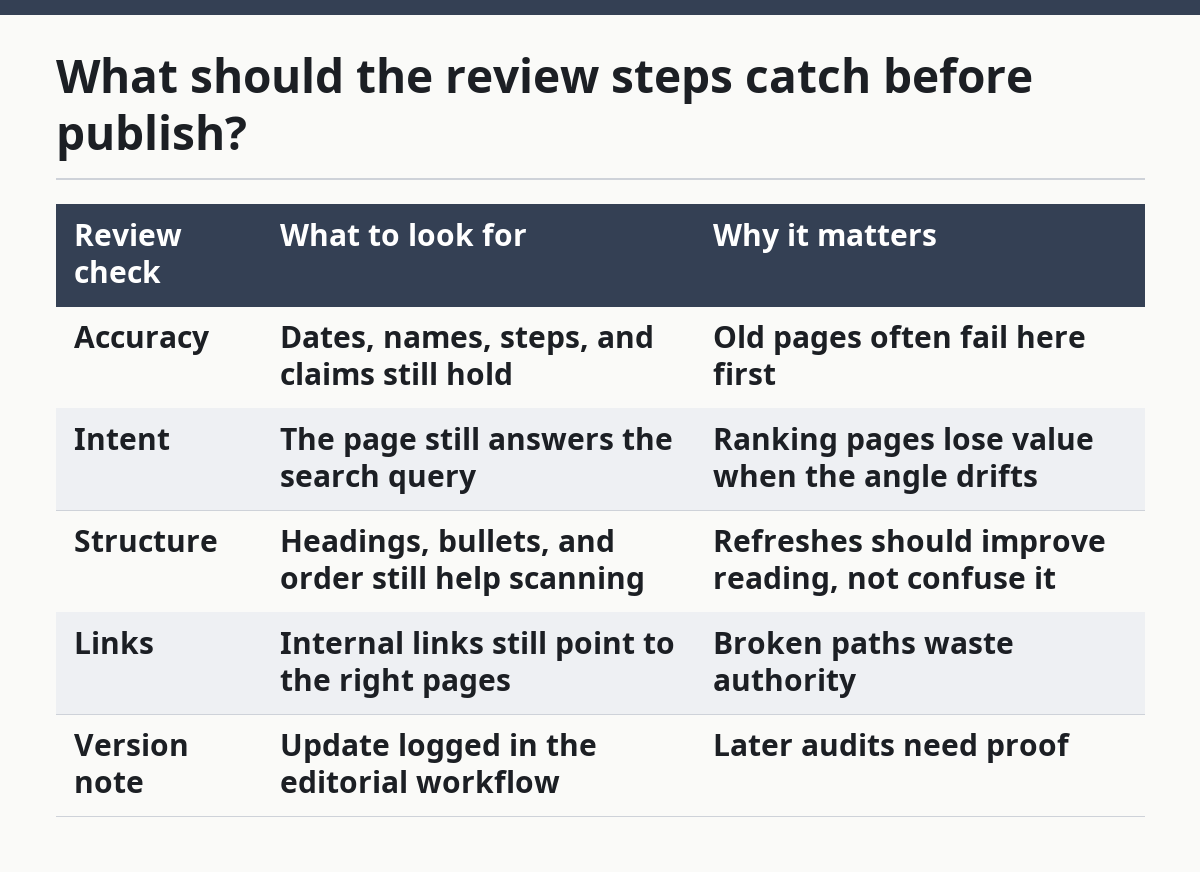
If a page fails one of these checks, send it back into the workflow. Do not force a publish because the calendar is full. That is how old pages become future cleanup work.
How should version control work for legacy pages?
Version control should show what changed, who changed it, and why the page changed. It does not need fancy software, but it does need consistency. A simple log in your content calendar or editorial workflow is enough for most teams.
Picture this: six weeks after publish, someone asks why a page lost a section. If you have a clean version note, the answer takes 20 seconds. If you do not, the team has to compare drafts by hand and guess at the reason. That is wasted time.
Use one naming rule for every refresh. For example, keep the page title in the file name, then add the update date and status. Save the brief, the AI draft, and the final approved version in the same folder. If your team works in a CMS, the note field still needs the same information.
A version trail also protects the refresh process from argument. When a page underperforms, you can compare the old copy with the new one and see what changed. That makes it easier to tell whether the issue was the edit, the query mix, or the page angle.
Keep these records every time
- original page URL
- refresh date
- target query
- editor and reviewer names
- summary of changes
- notes on removed or added sections
This is the part many teams skip. Then they call the process repeatable and wonder why no one trusts it.
What mistakes break repeatable refreshes?
The biggest mistakes are using AI to rewrite without a brief, refreshing pages with no demand, and changing too many variables at once. Each one makes the workflow harder to repeat and harder to measure.
Picture this: a team updates ten pages, changes the title, intro, headings, and body all at once, then cannot tell which change helped. That is not a refresh system. It is a stack of guesses.
A few mistakes show up again and again:
- No page selection rule: every old page becomes a candidate, so the queue fills with weak work.
- No version control: nobody can trace what changed.
- No review owner: errors slip through because everyone assumes someone else checked them.
- No standard brief: every writer invents a new process.
- Too much AI freedom: the draft sounds fine but misses the page’s real job.
The fix is boring and effective. Limit the workflow to a single brief format, a single review checklist, and a single publish log. Keep the structure stable for at least one quarter before changing it. If the team keeps switching tools or templates every two weeks, you never learn what worked.
The truth is, a repeatable system feels slower at first because it adds steps. Then it saves time because every page starts from the same rules.
How do you keep the workflow repeatable month after month?
Keep the workflow repeatable by putting it on a monthly content calendar, assigning fixed roles, and reviewing the same signals every cycle. The goal is not to refresh more pages. The goal is to refresh the right pages the same way each time.
Picture this: the month starts with a shortlist from Google Search Console, the editor fills in briefs, and the same review steps happen before publish. Nobody has to reinvent the process to handle a new batch of legacy pages. That is what makes it sustainable.
A monthly rhythm works well because it gives you enough time to collect candidates, brief them, draft them, and review them without rushing. If your site is large, you can run the same process weekly for a smaller batch. The cadence matters less than the consistency.
Keep one page in your ops doc that says exactly how a refresh moves from “candidate” to “live.” Include the owner for each step, the tools used, and the checklist used at review. That page becomes the standard, not a memory in someone’s head.
For a broader system around this, the hub on [AI-assisted content refresh workflows] can sit above this process and connect the related pieces without repeating the same procedure here.
A simple monthly cadence
- Pull candidate pages from Search Console.
- Score them against the refresh checklist.
- Assign briefs in the content calendar.
- Draft and edit in the editorial workflow.
- Log the version and publish date.
- Review results before the next cycle.
A repeatable workflow is less about fancy tools and more about fewer surprises. That is what makes legacy pages easier to manage over time.
How do I systemize content refreshes?
Systemize content refreshes by using one intake rule, one brief template, one review checklist, and one version log for every page. Put those steps into your content calendar so each page moves through the same path. If the steps change from page to page, the process is not systemized yet.
What does a legacy content workflow look like?
A legacy content workflow starts with page selection, then moves to a brief, an AI draft, human review, and versioned publish. The structure is usually five steps, and the same owner should not handle every step alone. That setup makes old pages easier to refresh without losing track of changes.
Drafted with AI; not yet reviewed by a person.