
AI SEO software pricing: which pricing model fits your workflow
Last updated: November 19, 2026
Quick Answer: AI SEO software pricing usually falls into three models, and the best fit depends on how many people use it, how often they use it, and whether your monthly volume is steady or spiky. This guide on AI SEO software pricing: which pricing model fits your workflow explains the trade-offs.
AI SEO software pricing usually makes sense in one of three ways: subscription plans, per-seat pricing, or usage-based limits. The right choice depends on how many people need access, how often you run AI features, and whether your workflow is steady or bursty. For AI SEO software pricing: which pricing model fits your workflow, the bill should match the work.
Key takeaways
- Subscription plans suit repeat users who want predictable monthly or annual billing.
- Per-seat pricing fits teams where each strategist, editor, or analyst needs their own login.
- Usage limits matter when the software charges by credits, prompts, reports, crawls, or exports.
- A free trial is most useful when you can stress-test your real workflow, not just click around the dashboard.
- The cheapest plan on paper can still become expensive if your team grows or your usage runs into caps.
AI SEO software pricing explained in plain English

AI SEO software pricing is the cost structure a vendor uses to charge for access to AI-assisted SEO tools, and the model matters more than the sticker price. If you publish a few pages a month, a flat subscription can be fine. If you run agency work across many buyers, per-seat pricing or usage limits can punish you fast if the plan does not match your output.
Most buyers run into four patterns, and you should consult a professional if your procurement rules, security needs, or tax setup are unusual; for procurement basics, see Gartner’s software pricing guidance and NIST’s cloud procurement resources:
| Pricing model | What you pay for | Best fit | What to skip |
|---|---|---|---|
| Subscription plans | Access to a set feature bundle for a month or year | Solo marketers and small teams with steady usage | Plan menus with many locked features you will not use |
| Per-seat pricing | Each named user gets a license | Teams with clear roles and regular logins | Tools where only one or two people actually need access |
| Usage limits | Credits, prompts, reports, crawls, or exports | Teams with predictable or spiky production needs | Heavy daily users on small allowance tiers |
| Free trial | Short-term access before purchase | Buyers comparing workflow fit | Trials that hide the exact feature you need |
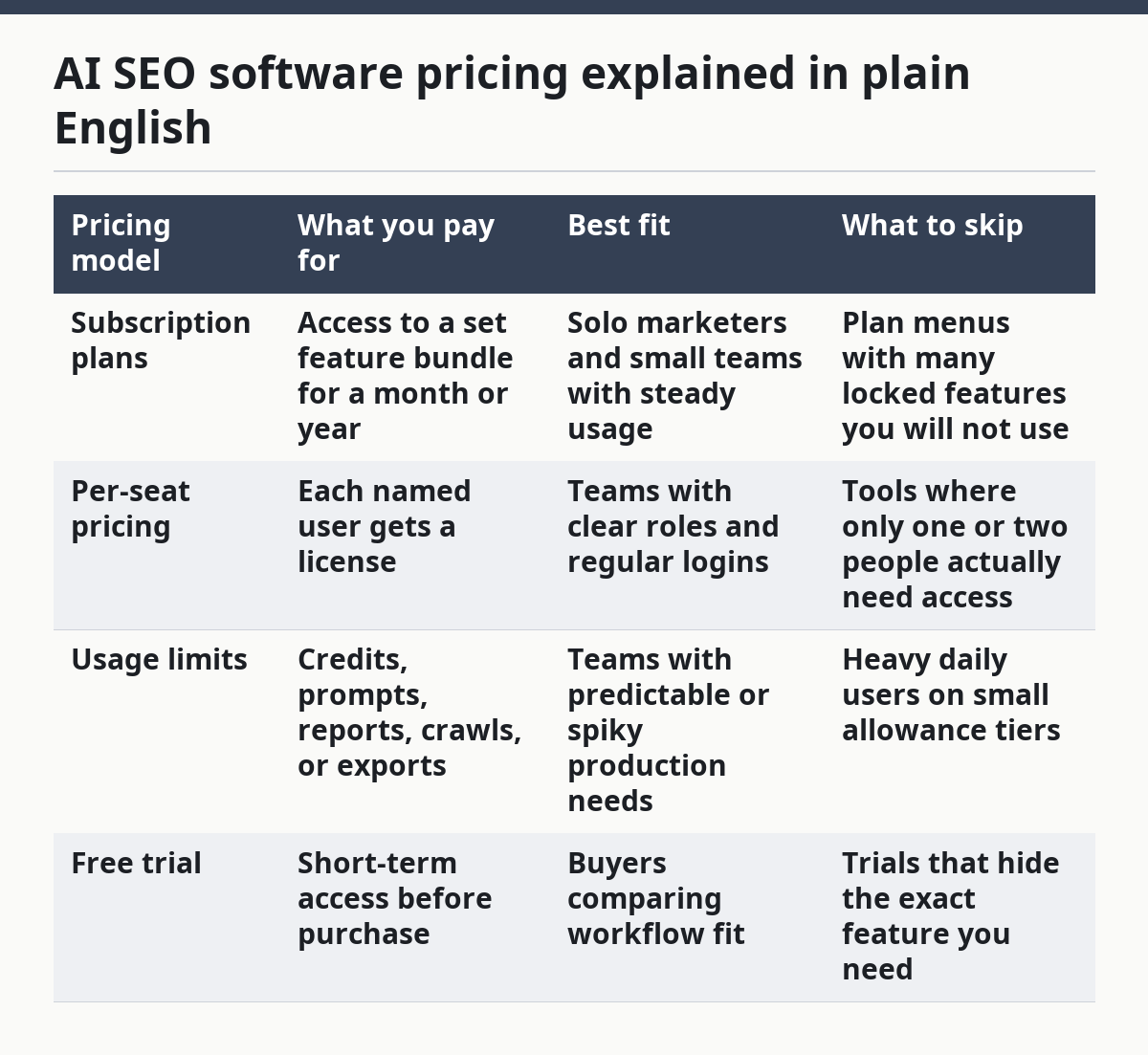
The mistake is treating AI SEO software pricing like a single number. It is really a match between billing method and workflow shape. A content team that generates 20 briefs a week will feel a different cost curve from an SEO manager who only needs AI for title ideas and schema drafts. One pays for volume. The other pays for convenience.
If you want the broader context for what these tools actually do, the hub on what is AI SEO software sits upstream of this guide and gives the basics without getting into pricing mechanics.
Which pricing model fits your workflow?
The best pricing model is usually the one that keeps your monthly bill aligned with how often the software gets used. If your workflow is steady, a subscription is often easiest to budget. If your workflow depends on headcount, per-seat pricing is often cleaner. If your usage swings with campaigns, usage limits may be the deciding factor.
Here is the practical way to choose:
- Map the work, not the tool. List the tasks you expect AI SEO software to handle: content briefs, keyword clustering, meta descriptions, internal linking suggestions, or SERP analysis. The result should be a short list of recurring jobs, not a feature wishlist.
- Count the active users. Separate occasional reviewers from daily operators. A 3-person content pod can look cheap on a flat plan, but per-seat pricing gets expensive if six editors need access and only two use the tool every day.
- Estimate monthly volume. Track the number of reports, prompts, exports, or crawls you will realistically run in a month. A usage-based plan works only if that volume stays inside the allowance without constant overages.
- Check the cap behavior. Find out what happens when you hit a limit: hard stop, throttling, extra charges, or a forced upgrade. The result matters more than the nominal plan name.
- Compare annual and monthly terms. Annual billing can lower the effective monthly cost, but it also locks you into a tool before your workflow is stable. Monthly billing is safer during rollout.
- Run the trial against a real project. Use the free trial on one live brief or one live optimization cycle. You want to see whether the tool fits a 30-minute task or a 3-hour task, not whether the interface looks polished.
This is where many buyers go wrong: they choose based on feature lists and ignore the billing logic underneath. A tool with generous AI generation but tight export caps can be fine for a writer and terrible for an agency analyst who needs repeatable buyer reporting.
The right model also depends on the role. Solo consultants usually want low-friction billing and minimal seat management. Agencies need a model that scales with buyers without forcing a license for every occasional reviewer. In-house teams often prefer subscription plans with predictable procurement, especially when approvals move once a quarter instead of every week; consult procurement and finance before locking in annual terms, and compare the plan to your internal approval cycle.
What subscription plans usually get right, and where they fail

Subscription plans usually get right the budgeting problem, but they can fail badly when the plan bundle is built for a different stage of growth. A fixed monthly or annual fee is easy to approve, easy to forecast, and easy to invoice. The problem is that “fixed” rarely means “fair.”
A flat plan works best when your usage is consistent from month to month. If your team creates SEO content on a steady cadence, the plan gives you stable cost control. It also makes sense when you want one central platform for recurring tasks and do not want staff watching credits disappear.
The weak spot is waste. If you buy a plan that includes advanced AI drafting, content scoring, and crawl features, but you only use keyword suggestions and title generation, the rest becomes dead spend. Another risk is tier jump pressure: a vendor may place useful features one level above your current plan, which can push you into paying for a bundle rather than the exact capability you need.
Subscription plans are usually wrong for teams that do not know their cadence yet. If you are still testing whether AI belongs in your SEO process, a 12-month commitment can be too rigid. Monthly billing is safer in the first 60 to 90 days, when you are still deciding whether the tool changes output or just adds another tab.
They are also a poor fit when you have large swings in demand. A seasonal publisher, launch-heavy SaaS team, or agency with irregular onboarding may find a flat plan too blunt. In those cases, a usage-linked model can make more sense because the bill tracks activity instead of sitting flat through quiet months.
A subscription is the simplest answer only when the workflow itself is simple: one team, repeatable tasks, and no major swing in volume. If the workflow is messier than that, the simplicity can turn into overpayment.
When does per-seat pricing make sense?
Per-seat pricing makes sense when access is tied to named people, not just to output. If three strategists, two editors, and one SEO lead all need logins, per-seat billing gives you a clean way to assign responsibility and control who can use the software. It is the most familiar model for teams that already buy collaboration software this way.
The advantage is clarity. You know which license belongs to which person, and the vendor knows how many users are active. That helps with onboarding, permissioning, and audits inside larger organizations. It can also reduce chaos when multiple people need comments, saved templates, or shared workspaces.
The drawback is underuse. If a team member only logs in once a month to approve a brief, a full seat can be a poor deal. Per-seat pricing often becomes expensive in agencies and content teams where lots of people touch the process but only a few people do the heavy lifting.
Per-seat pricing also creates a growth trap. Adding one freelancer, one reviewer, or one buyer-facing manager can quietly increase the bill even if your usage stays flat. That is why seat count should be reviewed alongside workflow, not after the invoice lands.
This model is a bad fit for roles that rotate often or only need read-only access. It is also a bad fit for ad hoc collaboration, where a few people need temporary access for a single campaign. In that case, a usage-based or project-based arrangement, if available, may be more rational than paying for permanent seats.
If you do choose per-seat billing, ask one practical question: how many people will use the tool every week, not just every quarter? That answer usually exposes whether the model is efficient or merely familiar.
Usage limits: the hidden cost most buyers miss
Usage limits are the part of AI SEO software pricing that most often changes the final bill. A plan can look affordable until you run out of credits, hit a crawl ceiling, or exceed the monthly allowance for AI-generated outputs. Then the real cost appears in overages, upgrades, or blocked work.
Usage-based pricing can be excellent when output volume is uneven. A team that runs big content pushes once a month may prefer to pay for activity instead of idle access. It can also be efficient for solo users who rely on the tool only for specific jobs, such as outlines, metadata, or content refreshes.
The problem is predictability. If the vendor measures usage in credits, tokens, searches, reports, or exports, you need to understand which action burns budget fastest. Two plans can look similar while one quietly charges more for the exact tasks you use most. That is why “unlimited” marketing deserves skepticism; the real limit is often hidden in fair-use language, speed throttling, or feature restrictions.
This model is wrong for teams with high daily volume and tight deadlines. If your workflow includes repeated briefs, recurring audits, or many buyer sites, a usage cap can interrupt production at the worst moment. The cost of stopping work is often higher than the cost of a larger subscription.
The fix is to model the month before you buy. Count your expected reports, drafts, or crawls, then compare that number to the allowance. If the math is close, assume real usage will be higher than the estimate. Work expands when a tool is easy to use.
The best usage-based plans are the ones that make overages visible and easy to forecast. The worst ones turn each extra task into a surprise. For a buyer, the question is not “Is there a cap?” It is “What happens when I reach it, and how much does the next step cost?”
How to use the free trial without wasting it
A free trial is worth using only if it shows you the exact workflow you expect to repeat after purchase. If the trial is too short, too limited, or too padded with sample data, it tells you very little. A 7-day trial can be enough for a narrow use case, but only if you already know what you are testing.
Use the trial on one real project and score it against three things: setup time, output quality, and billing fit. First, connect the actual data sources or project settings you would use after purchase. Second, run the exact task that matters most to you, such as generating a content brief or auditing a page set. Third, check whether the plan behavior matches the billing model you expect, including any 1-seat or limited-credit restrictions.
Do not spend the trial exploring every menu. That is how people miss the pricing issue entirely. A useful trial should answer a simple question: can this software support my workflow without forcing me to change how I work?
There is a second test that matters just as much: watch for plan friction. If a trial requires a sales call before you can see the limits, or if it hides the number of actions included, that is a warning sign. Not because the product is bad, but because pricing may be harder to predict than it should be.
A free trial is most valuable for buyers moving from spreadsheets or multiple niche tools into one platform. It is less useful if you already know you need a specific billing structure. In that case, the trial should confirm the economics, not replace them.
The pricing model that is wrong for your team
The wrong pricing model is the one that charges for behavior you do not have. If your team is small and steady, a complex usage meter can create more accounting than value. If your team is large and collaborative, a single-user plan will fail the first time more than one person needs access. If your workload rises and falls, a flat annual subscription can lock you into paying for quiet months.
Here is the clean rule: match the pricing model to your most common month, not your busiest one and not your cheapest one. The common month tells you what the tool will really cost to run.
Skip per-seat pricing if most of your access is occasional. Skip usage-based pricing if your production is constant and deadline-driven. Skip long annual commitments if you are still changing your process every few weeks. And skip any plan that makes you guess how limits work, because that guess usually becomes an invoice.
The right choice is not the cheapest-looking plan. It is the plan that stays affordable after a team grows, a campaign spikes, or a month gets messy. That is the difference between buying software and buying friction.
Drafted with AI; not yet reviewed by a person.