AI content writing tools pricing: what drives cost
Last updated: November 19, 2026
Key Takeaways
- Main pricing levers usually come down to seats, usage, features, and team access.
- The right plan depends on who touches the work and how often they use the tool.
- Match monthly output to the billing model, then check whether needed features sit one tier up.
- Skip any plan that looks cheap only because it leaves out work you need to do.
AI content writing tools pricing depends on four things first: how many seats you need, how much usage is included, which feature tier you pick, and whether the plan is built for one writer or a team. AI content writing tools pricing matters most when you compare the billing model, because the cheapest plan is not always the best fit if it caps output too tightly or hides the collaboration features you need.
A good plan matches your writing volume to the billing model. A plan can look cheap at first and then cost more once you add seats, run out of credits, or discover the team plan is the only tier with approval workflows.
What actually changes the price of an AI writing plan?
AI content writing tools pricing changes because the tool is selling access in different ways, not just “AI writing.” A solo plan with 1 seat and light usage can cost far less than a team plan with shared workspaces, admin controls, and higher limits, even when both tools write the same kind of draft.
The main pricing levers are usually these:
- Seat-based pricing. You pay per user. If a plan is $29 per seat and you add 4 writers, the bill scales fast.
- Usage limits. Some plans limit word counts, credits, documents, projects, or generations each month. A low sticker price can hide a hard cap that makes the plan useless for a busy team.
- Feature tiers. Basic tiers may include draft generation, while higher tiers open brand voice, templates, SEO-related workflows, analytics, or collaboration.
- Team plans. These often bundle shared billing, user management, permissions, and review tools. They cost more because they replace several small subscriptions and manual coordination.
- Trial access. A free trial or limited free tier can lower the first month’s risk, but it does not tell you the long-term cost if the paid plan is the only one with the features you need.
The cleanest way to judge price is to ask a simple question: does the plan charge for the number of people, the amount of content, or the workflow features your team actually uses? A tool that sells by seat is easier to forecast; a tool that sells by credits can be cheaper for light users and annoying for heavy ones.
For pricing basics, OpenAI documents usage-based billing in its API pricing pages, and Zapier’s pricing guide explains how seat and feature limits affect software cost.
How do seat-based pricing, usage limits, and feature tiers interact?
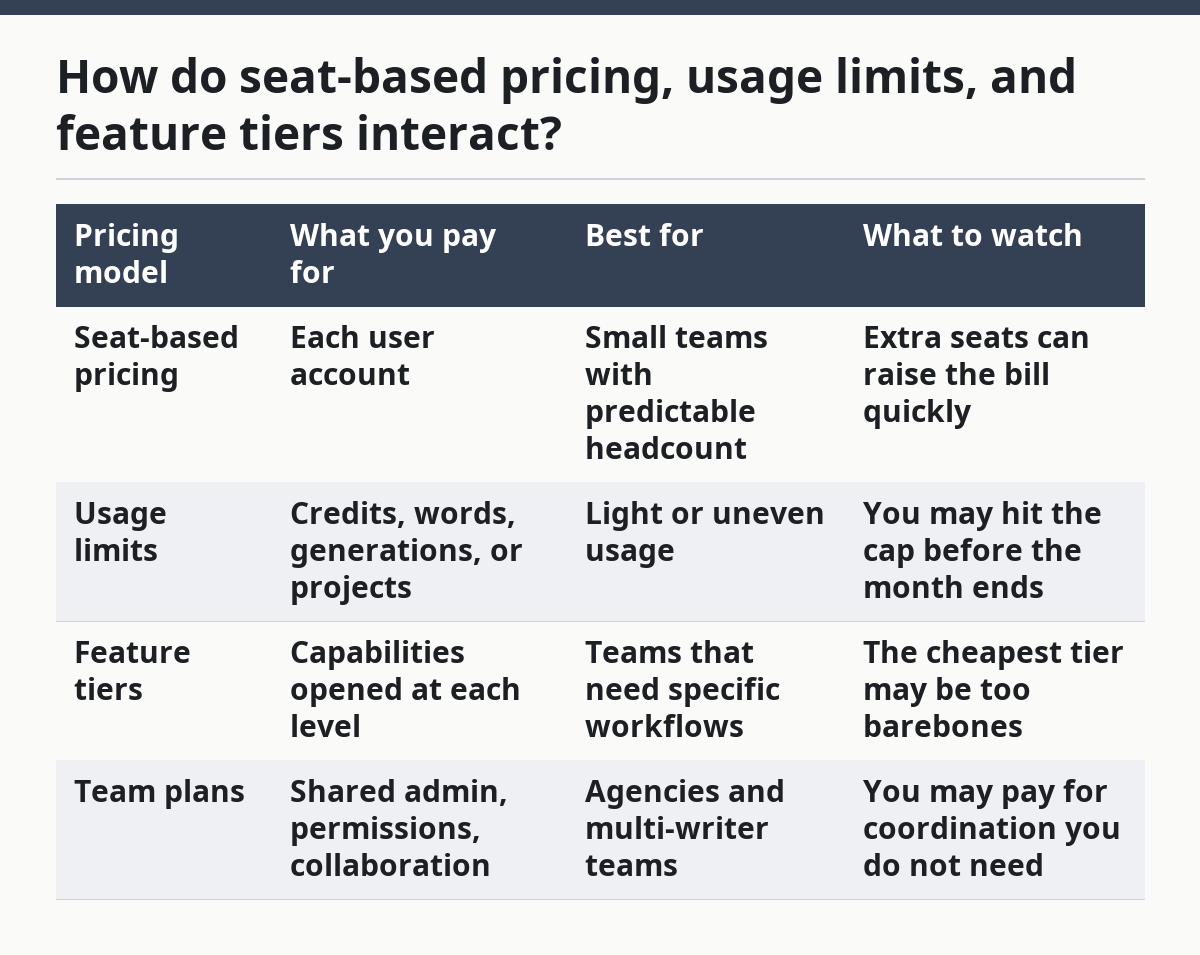
AI content writing tools pricing becomes harder to compare because the billing models combine, which is why many buyers misread the headline price. A plan can look affordable at $20 to $40 per seat, then become expensive once the usage cap forces an upgrade or the feature tier blocks the work you came to do.
Here is the basic pattern:
| Pricing model | What you pay for | Best for | What to watch |
|---|---|---|---|
| Seat-based pricing | Each user account | Small teams with predictable headcount | Extra seats can raise the bill quickly |
| Usage limits | Credits, words, generations, or projects | Light or uneven usage | You may hit the cap before the month ends |
| Feature tiers | Capabilities opened at each level | Teams that need specific workflows | The cheapest tier may be too barebones |
| Team plans | Shared admin, permissions, collaboration | Agencies and multi-writer teams | You may pay for coordination you do not need |
The tricky part is that one pricing model often sits on top of another. A team plan can still have per-seat billing. A premium feature tier can still impose usage limits. A free trial can include the interface but not the collaboration features, which makes it poor evidence for what you will really pay.
A practical example: if a 3-person team uses one tool lightly for social drafts and another for long-form articles, the first may fit a low-usage plan. The second may need a higher tier because longer documents, more revisions, or more generations burn through included credits faster. The same logo on the pricing page does not mean the same real cost.
When you compare plans, look for the unit that scales with your behavior. If your team writes 20 short posts a month, seat count may matter more than usage. If one writer generates 100 drafts a month, usage limits matter more than seat count. That distinction saves money better than chasing the lowest monthly number.
Which pricing plan fits a solo writer, a small team, or an agency?
The right plan depends on who touches the work and how often they use the tool. A solo writer usually wants the lowest tier that still includes enough monthly usage to avoid constant upgrades, while a team or agency usually needs higher tiers because coordination costs more than generation.
Here is the short version:
- Solo writer: Pick a low-seat or single-user plan with enough monthly credits for your normal output. Skip expensive team features you will not use. If the plan only makes sense after you add 2 or 3 paid seats, it is not built for you.
- Small team: Pick a plan with shared billing, at least basic collaboration, and enough usage for the busiest person on the team. Skip a cheap individual plan that forces everyone to work separately.
- Agency: Pick a team plan with permissions, shared folders, and admin control. Skip plans that charge low entry pricing but make every client workspace feel bolted on.
- Occasional user: Consider a free trial or the lightest paid tier. Skip annual commitments until you know whether the tool fits your weekly rhythm.
- Heavy-volume content shop: Pick the plan with the highest included usage and the clearest overage policy. Skip plans that bury limits inside vague wording like “fair use” without saying what that means in practice.
The most expensive mistake is buying for the wrong unit of value. A solo consultant who publishes one polished article a week does not need an agency control panel. A 6-person content team does not need six separate logins on the cheapest plan if the billing model makes collaboration awkward.
The plan should mirror your work structure. If it does not, the tool may be inexpensive on paper and expensive in friction.
How to choose a plan without overpaying
You choose the plan by mapping your monthly output to the billing model, then checking whether the features you need are locked one tier up. That sounds basic, but it is the only reliable way to avoid paying for unused capacity or underbuying and upgrading two weeks later.
Use this procedure:
- Count seats first. Write down how many people will log in during a normal month, not the largest possible team. The result is a realistic baseline for seat-based pricing.
- Estimate monthly usage. Count the drafts, rewrites, or documents your team creates in a typical 30-day period. This tells you whether word caps or credit limits matter more than the sticker price.
- List the features you actually need. Note whether you need brand voice, collaboration, templates, export options, or approval workflows. The result should be a short must-have list, not a wish list.
- Check the tier where those features appear. Many tools hide useful functions in mid-tier or premium plans. If one feature you need is only available at the next level, factor that into the cost instead of comparing the cheapest plan only.
- Compare the true monthly total. Add seat costs, expected overages, and any add-ons. A plan that starts cheap but charges extra for more users can end up costing more than a higher tier.
- Use the trial to confirm fit, not to judge price alone. A 7-day or 14-day trial shows workflow fit, but it may not reveal the long-term monthly cost if the trial omits team features or usage caps.
The goal is not to find the lowest advertised number. The goal is to find the plan that costs the least for the way your team actually writes. If you buy a plan because the starting price is low and the usage limit is generous, you may still end up paying more once you add the one feature that makes the tool usable.
This is where many buyers go wrong: they compare tools by monthly price and ignore the shape of the bill. A flat fee is easy to budget. A per-seat plan with credits, add-ons, and tiered features is not. The safer choice is the one you can explain to a manager in one sentence.
What should you skip on the pricing page?
You should skip any plan that looks cheap only because it leaves out the work you need to do. A low price is not a bargain if the next tier is the first one that supports collaboration, higher usage, or the export options your workflow depends on.
Common traps include:
- Tiny usage caps. A plan with very low included credits can force frequent upgrades. That costs more than a higher tier after a few busy weeks.
- Feature bundles you will not use. Paying for analytics or advanced team controls makes no sense if you are a solo writer who only needs draft generation.
- Annual pricing too early. Annual billing can lower the monthly figure, but it also locks you in before you know whether the tool fits your process.
- Per-seat pricing without shared value. If one person uses the tool and three others barely log in, a seat-based model can waste money.
- Trial pages that hide the real limits. Some trials are good for testing the interface and bad for judging whether the paid plan is affordable at scale.
The right skip list saves more money than chasing discounts. If a plan asks you to pay for team controls, but your workflow is one person and a spreadsheet, skip it. If a plan looks cheap but includes only a few credits, skip it unless your output is genuinely light.
One useful rule: do not buy a plan because it is the “starter” tier unless the starter tier already includes the feature you would actually miss if it disappeared tomorrow. If not, the cheapest plan is just a teaser.
For a broader primer on the tools themselves, the hub on what AI content writing tools are gives the background that this pricing guide intentionally leaves out.
What a fair price looks like in practice
AI content writing tools pricing is fair when the cost matches your output, your team size, and the features you need without forcing you into an upgrade you do not need. In practice, that usually means a single-user plan for a solo creator, a mid-tier team plan for a small group, or a higher tier for agencies that need permissions and shared workflows.
A fair plan has three traits:
- it makes the billing unit obvious;
- it shows the main limit in plain language;
- it puts the features you need within reach without a surprise add-on.
A bad plan does the opposite. It hides the limit, mixes several billing units together, or places the one useful collaboration feature behind a much higher tier.
If you are comparing AI content writing tools pricing for the first time, start with the plan that fits your current workload, not the one that sounds aspirational. A cheaper plan that you can outgrow in 60 days is often better than an expensive plan that sits half unused. The best purchase is the one that still makes sense after the first busy month, not just on the pricing page.
For model definitions and billing terms, see the Capterra pricing glossary and Google’s own billing documentation for how usage-based charges are described.
Drafted with AI; not yet reviewed by a person.