How to Set Refresh Triggers for SEO Content Based on Performance
Last updated: November 19, 2026
Quick answer: set refresh triggers for SEO content based on performance signals by reviewing traffic, rankings, CTR, and conversions against the page’s own baseline, then act when a decline holds for 2 straight review windows.
This article explains how to set refresh triggers for SEO content based on performance signals, which metrics to watch first, and when a calendar check still matters.
Key Takeaways
- Set a rule that separates normal fluctuation from a page that needs work.
- Compare the current 28-day or 90-day window with the page’s own baseline.
- A ranking trigger should fire when key queries fall for 2 to 4 weeks.
- A CTR trigger should fire when impressions hold steady or rise while clicks fall.
What refresh triggers should watch first

However, when you are setting refresh triggers for SEO content based on performance signals, start with the page data you can verify in Google Search Console and Google Analytics. A flat graph is not enough on its own; you need a rule that separates noise from a real decline.
The right trigger starts with ranking data, click-through rate, organic traffic, and conversions. If one of those slips for long enough, the page is asking for a refresh. Here’s the catch: a trigger only works if you compare the page to its own normal range, not to a random target from a blog post.
Use this order:
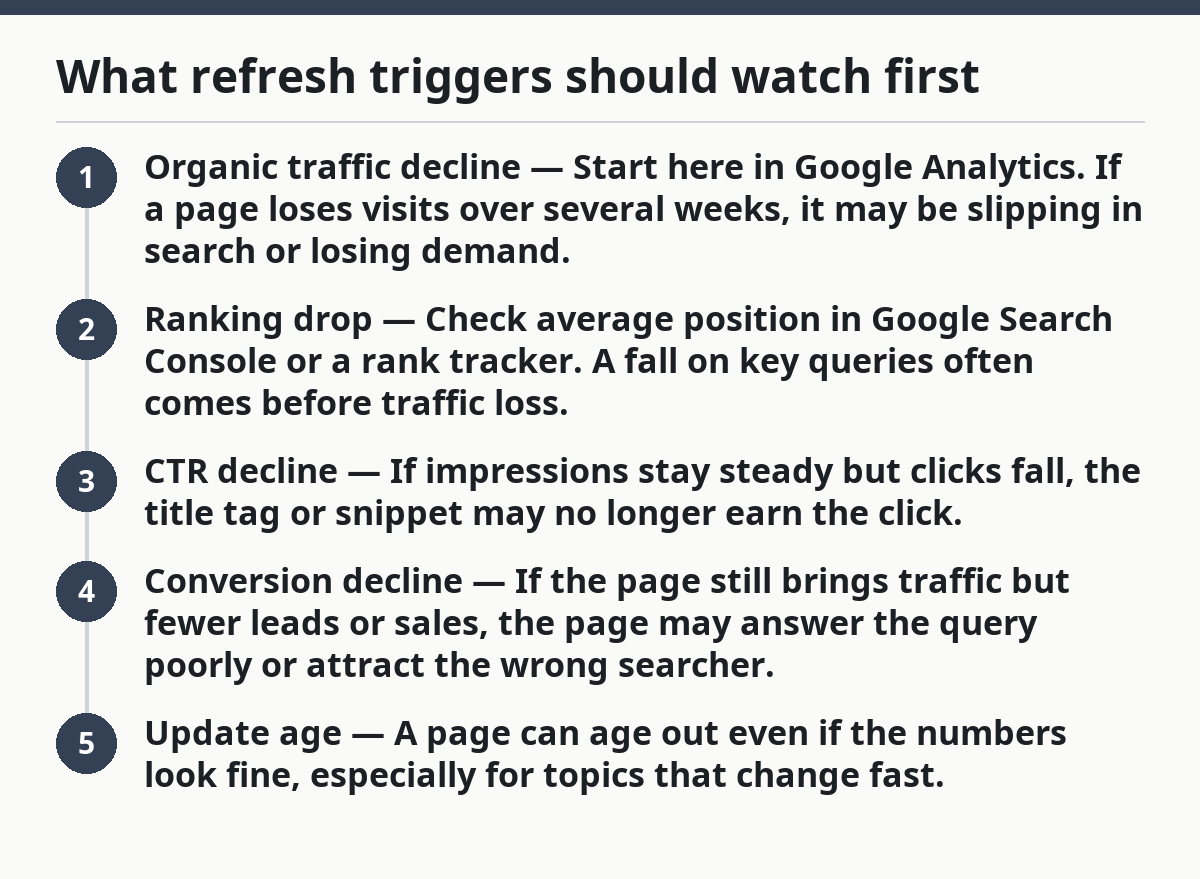
- Organic traffic decline — Start here in Google Analytics. If a page loses visits over several weeks, it may be slipping in search or losing demand.
- Ranking drop — Check average position in Google Search Console or a rank tracker. A fall on key queries often comes before traffic loss.
- CTR decline — If impressions stay steady but clicks fall, the title tag or snippet may no longer earn the click.
- Conversion decline — If the page still brings traffic but fewer leads or sales, the page may answer the query poorly or attract the wrong searcher.
- Update age — A page can age out even if the numbers look fine, especially for topics that change fast.
A clean trigger is specific. “Traffic is down” is vague. Traffic is down 20% for 28 days is a signal you can act on. For a practical framework on measurement windows, see Google’s guidance in Google Search Console Help and Google Analytics Help.
How do you set a refresh trigger from organic traffic?
Therefore, to set a traffic trigger for SEO content based on performance signals, compare the current 28-day or 90-day period with the page’s own prior baseline. That gives you a rule tied to the page, not the mood of the week.
You do not want to refresh every dip. Instead, use a trigger that ignores small swings and catches a real slide.
Use a simple threshold system:
- Pick one window: 28 days for fast-moving pages, 90 days for slower topics.
- Compare organic sessions to the previous equal window.
- Trigger a review if the drop lasts for two consecutive periods.
- Keep a higher bar for pages with small traffic, where one bad week can distort the picture.
A practical rule looks like this:
- A page down a little for one period: watch it.
- A page down across two periods: inspect it.
- A page down across three periods: refresh it unless seasonality explains the dip.
Do not set one hard percentage for every page and call it done. A page that gets 5,000 visits a month and a page that gets 50 do not behave the same way. The first can absorb a small wobble. The second may need a review just because one keyword slipped.
This is where a simple internal playbook helps. If you also need a broader system for maintaining pages, the hub on content freshness and update systems shows how refresh work fits into ongoing maintenance.
What ranking drop should trigger a refresh?

Because ranking loss is often the earliest visible signal, a ranking trigger should fire when a page falls on the queries that matter most, especially if the drop holds for 2 to 4 weeks. A brief wobble is normal; a sustained fall is a different story.
You may not see a traffic crash right away, but the page is already losing ground when it slips from a strong position to a weaker one. That is why rank checks should sit next to traffic checks, not replace them.
Use ranking signals in layers:
- Main query drop: if the primary keyword loses several positions and stays there, review the page.
- Cluster drop: if a group of related queries all slip, the page may need a broader update.
- Page-wide drift: if average position trends down across most queries, the page may be tiring out.
Two notes matter here. First, do not react to a single keyword if the page still wins on the cluster. Second, do not wait for a dramatic collapse. A drop from position 3 to 7 can cost more clicks than the graph suggests.
A good trigger rule is:
- One query down briefly: no action yet.
- Main query down for 2 weeks: inspect content, titles, and intent match.
- Several key queries down for 4 weeks: schedule a refresh.
This is where Google Search Console helps, because it shows query-level movement, not just page-level traffic. If the page is slipping on the exact terms that bring the right searchers, the update should focus there first. For another authoritative reference on performance measurement, consult Google Search Central.
How to use CTR decline as a refresh trigger
However, a CTR trigger should fire when impressions stay flat or rise while clicks fall, because that usually means the snippet no longer earns attention. That is often a title, meta description, or intent-match problem.
The page may still rank, but fewer people click it. The result is a quiet loss. The page looks healthy at a glance, yet it is leaking traffic one search at a time.
Watch for these patterns in Google Search Console:
- Impressions steady, CTR down: the snippet is weaker than the competition.
- Rank stable, CTR down: the page may no longer promise the right answer.
- CTR down across several queries: the headline may not match search intent.
A CTR trigger works best when you pair it with rank. If ranking drops and CTR drops, the page may need a deeper refresh. If ranking is stable and CTR drops, start with the snippet first. That can be a fast win.
Use this rule:
- Check the page’s top queries in Search Console.
- Compare current CTR with the prior 28 days or 90 days.
- Look for stable impressions and stable rank.
- If CTR falls across the main queries, refresh the title, meta description, and intro.
Don’t overreact to low CTR on branded queries or odd long-tail phrases. Those can distort the average. Focus on the queries that drive the page’s real organic value.
This is where many teams go wrong: they refresh the body text when the problem is really the snippet. That wastes time and can muddy the signal.
When a conversion drop matters more than traffic
Meanwhile, a conversion trigger should fire when organic traffic is still coming in, but the page is bringing fewer leads, signups, or sales over a meaningful period. That means the page is attracting visitors, yet failing to move them.
The page may still rank and get clicks, but the form fills may have fallen. In that case, the page may be pulling in the wrong intent, missing proof, or hiding the next step.
Use conversion as a refresh trigger when:
- Organic traffic is steady, but conversions fall for 30 days or more.
- The page ranks for broader terms than it used to.
- The call to action no longer fits the search intent.
- Users land, skim, and leave without taking the next step.
This signal matters because traffic alone can lie. A page can look healthy in Google Analytics and still underperform for the business. If the query set shifted from “how to” to “best tools,” for example, the page may need a different angle, not just new wording.
The fix is often simple but not shallow:
- tighten the intro,
- add clearer proof,
- move the CTA closer to the first screen,
- update examples,
- remove old references that make the page feel stale.
If the page is informational and conversion is not the main goal, use a softer version of this trigger. For those pages, a rise in bounce or a fall in engaged sessions can point to the same issue: the page no longer matches the intent behind the click. For YMYL pages, treat the update carefully and consult a qualified professional or subject-matter expert when the content affects health, money, or safety; see Google’s guidance on YMYL content.
Set an update cadence that fits the page type
Therefore, a refresh cadence should match how fast the topic changes and how much search value the page has. Not every page needs the same review rhythm, and a calendar alone will miss the pages that decay fastest.
One page may cover a fast-moving SEO topic, and another may be a stable evergreen guide. Both sit in the same site, but they age at different speeds.
Use a simple cadence by page type:
- Fast-changing topics: review every 30 to 60 days.
- Core evergreen pages: review every 90 days.
- Low-priority pages: review every 6 months.
- High-traffic money pages: review on a shorter cycle, even if signals are stable.
A cadence is not the trigger itself. It is the safety net. Performance signals tell you when to act early. The calendar catches pages that are quietly drifting without a sharp drop yet.
A useful system pairs both:
- Trigger-based refreshes for pages with visible decline.
- Calendar-based reviews for pages that have not yet declined.
- Seasonal checks for pages tied to holidays, pricing cycles, or annual trends.
Do not use one sitewide schedule for everything. That creates two problems: busy pages get ignored until they slip, and quiet pages get refreshed for no reason. The better rule is simple. Use the signal first, the calendar second.
If you need a broader framework around freshness, the hub on content freshness and update systems fills in the bigger system around these triggers.
Common mistakes that make refresh triggers useless
So refresh triggers fail when they are too vague, too noisy, or tied to the wrong metric. The page then gets updated for panic instead of performance.
Every month, someone sees a dip and edits the page. The title changes, the intro changes, the links change, and no one knows what fixed anything.
The most common mistakes are:
- Using only one metric: traffic can drop while CTR stays fine, or rankings can dip while conversions rise.
- Reacting to one bad week: short dips are often noise, especially on low-volume pages.
- Ignoring query mix: a page may lose one keyword but gain another.
- Refreshing without a reason: random edits blur the signal and make later analysis harder.
- Treating every page the same: a product page and a glossary page should not share the same trigger, so review them with the guidance of a qualified SEO or content strategist when the page type carries different business risk. For more on intent and content quality, see Google Search Central.
What does that cost? Time, clarity, and sometimes rankings. A page that gets constant random edits can lose its shape. Search engines also need time to recrawl, so constant tinkering can hide whether the last change helped.
Do this instead:
- Pick two or three signals for each page type.
- Set a baseline window, usually 28 days or 90 days.
- Require a sustained drop before action.
- Log the reason for every refresh so you can compare before and after.
That last step matters more than people think. If you do not record why the page changed, you cannot tell whether the trigger was worth using. A simple log also makes it easier to compare one refresh against the next.
How to turn signals into a refresh rule you can run every month
Ultimately, a workable refresh rule is a short checklist that tells you when to act, what to inspect, and what counts as a hold. That keeps the process calm and repeatable.
Once a month, you can scan a list of URLs and avoid a debate for each one. The rule tells you what to do next.
Use this monthly workflow:
- Pull organic traffic, CTR, and rank data for the last 28 days and 90 days.
- Flag pages with a sustained drop in one or more signals.
- Check whether the drop is broad or limited to one query.
- If traffic, rank, or CTR is down for two periods, assign a refresh.
- If conversion fell but the other signals are steady, inspect intent and CTA alignment.
- If no signal moved, leave the page alone and revisit on the normal cadence.
The rule should be strict enough to save time and flexible enough to catch real decay. That means no one-off panic edits, but also no waiting until the page is buried.
A plain version you can use is this: refresh when at least one core signal is down for two straight review windows, and the drop lines up with the page’s main queries or conversions. That is clear enough to explain inside a team.
FAQ
When should I refresh SEO content?
Therefore, refresh SEO content when a page shows a real drop in traffic, rankings, CTR, or conversions over a sustained period, usually across two review windows. A page with stable numbers can wait for its normal cadence, but one with repeat decline should move into the refresh queue.
What signals mean a page needs updating?
In particular, a page needs updating when organic traffic falls, rankings slide on key queries, CTR drops while impressions stay steady, or conversions weaken without another clear reason. The strongest signal is usually a pattern, not a single metric. One dip can be noise. Two or more together are harder to ignore.
How often should SEO pages be reviewed?
Overall, SEO pages should be reviewed every 30 to 60 days for fast-moving topics, every 90 days for evergreen pages, and about every 6 months for lower-priority pages. The right cadence depends on how often the topic changes and how much traffic the page brings in.
Drafted with AI; not yet reviewed by a person.