How to Format Lists, Steps, and Tables for AI Citations
Last updated: November 19, 2026
Quick Answer: use 3 to 7 items, 10 to 18 words per list item, and one action per step. If your lists, steps, and tables are messy, the answer engine will skip them and cite cleaner pages instead. Format content so each item is short, consistent, and easy to quote. This article on how to format lists, steps, and tables for AI citations shows how to make a page easier to lift into AI citations.
Key Takeaways
- Good formatting makes each block easy to scan, compare, and quote in one pass.
- For AI citations, keep each bullet to one claim and use parallel labels.
- Make each numbered step one action with one clear outcome.
- Use a table when the reader needs to compare columns, not just read items.
What content formatting needs to do for AI citations
Picture this: you’ve written a helpful page, but the answer engine keeps pulling a different site because your bullets run long and your table has no clear labels. Good content formatting fixes that by making each block easy to scan, compare, and quote in one pass.
The goal is not pretty layout for its own sake. It’s extractable structure: a list that reads like a list, a step that reads like one action, and a table whose columns say exactly what each row means. A clean block with 3 to 7 items is usually easier to cite than a dense wall of prose.
The truth is, AI systems tend to quote text that already looks organized. That means your job is to remove friction. Use plain nouns, one idea per line, and the same label pattern from top to bottom.
- Make each bullet one point.
- Make each step one action.
- Make each table cell short.
A generic article would stop here and say “write clearly.” That’s too vague. The better move is to design blocks that can stand alone when quoted. That is the difference between a paragraph that sounds nice and a block that gets used.
How do I format lists for AI citations?
You format lists for AI citations by keeping each bullet to a single claim and keeping the labels parallel. If one item starts with a verb and the next starts with a noun phrase, the list gets harder to parse and easier to ignore.
Use bullets when the items are equal and order does not matter. Use a numbered list when order matters, and keep each line tight. A good list item usually fits in 10 to 18 words, though some topics need a bit more. The key is that each bullet should carry one clean idea.
Here’s the catch: mixed labels break the rhythm. If one bullet says “Short intro,” the next should not say “Explain why this matters in detail.” Keep the shape the same.
- Start each bullet with the same part of speech.
- Put one fact in each bullet.
- Keep the bullets in one reading level.
That pattern helps both readers and an answer engine. It also makes it easy to turn a list into quoted text without trimming half the meaning. If a bullet needs a comma list inside it, it’s probably doing too much work.
A list should do one job
A list is best for features, signs, examples, or quick rules. It is not a dumping ground for three sentences per item. If you need a paragraph under every bullet, split the section or make a table instead.
How do I format numbered steps so AI can cite them?
You format numbered steps by making each step a single action with a clear outcome. A step block works best when the reader can follow it in under 2 minutes and see what changes after each move.
Each step should begin with a verb and name the tool, setting, or block the reader is working in. That gives the answer engine a clean action chain. A step like “Open the editor and add a 3-column table” is easier to quote than “You should probably make the layout more structured.”
Now you might be wondering what breaks this most often. It’s the extra commentary. If the step contains a tip, a warning, and a second action, the extraction gets muddy.
- Open the content block and find the list, step, or table you want to format.
- Split any line that carries more than one idea into separate items.
- Standardize the wording so each item starts the same way.
- Trim each step to one action and one result.
- Check that the order matches the task, not the writing order.
That structure gives the reader a clean path and gives the answer engine a sequence it can quote without guessing. A step block with a clear verb at the front is harder to misread than a paragraph full of “you can,” “you may,” and “it depends.”
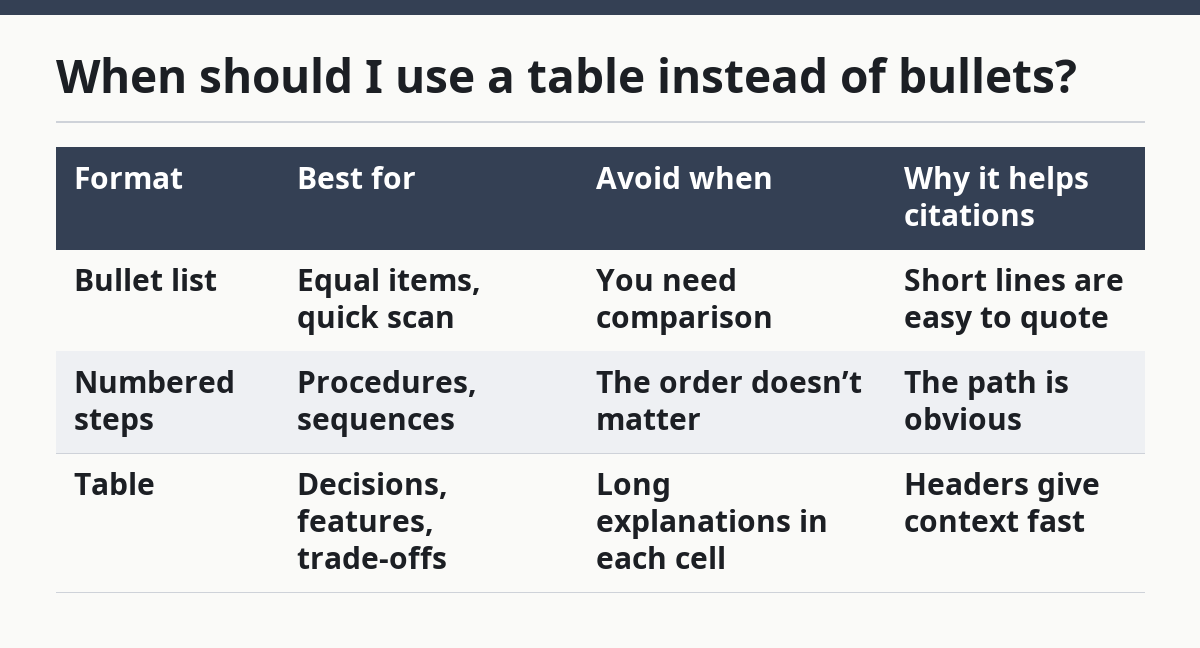
When should I use a table instead of bullets?
Use a table instead of bullets when the reader needs to compare columns, not just read items. A table is the right shape for decision tables, side-by-side traits, and comparison sections where one row equals one option.
Bullets are fine for a simple set of points. Tables win when the page needs structure across two axes, like “feature” and “option.” If the same line has to answer “what it is,” “who it’s for,” and “what makes it different,” a table usually beats a list.
Instead of guessing, use the table when a comparison needs two or more columns. Tables make the columns do the work. Once the headers are clear, the answer engine can pull a row with less risk of mixing up the parts.
| Format | Best for | Avoid when | Why it helps citations |
|---|---|---|---|
| Bullet list | Equal items, quick scan | You need comparison | Short lines are easy to quote |
| Numbered steps | Procedures, sequences | The order doesn’t matter | The path is obvious |
| Table | Decisions, features, trade-offs | Long explanations in each cell | Headers give context fast |
Keep each cell short, ideally a phrase rather than a paragraph. If a cell starts turning into a mini article, the table stops being a table and starts becoming a cluttered grid.
How do I format a comparison table for AI answers?
You format a comparison table for AI answers by making the headers obvious and the rows symmetrical. The reader should be able to compare 2 to 5 options without hunting for the key point in each cell.
Use one row per option and one column per decision point. “Best for,” “Core spec,” and “Standout feature” are better than vague labels like “Notes” or “Info.” Those exact headers help the answer engine understand what each column is for.
The biggest mistake is uneven detail. If one row has 12 words and another has 40, the table looks biased and the citation gets noisy. Keep the rows balanced.
| Option | Best For | Core Spec | Standout Feature | Action |
|---|---|---|---|---|
| Option A | Fast scan | Short bullets | Simple layout | Use for quick facts |
| Option B | Step-by-step guidance | Ordered list | Clear sequence | Use for procedures |
| Option C | Side-by-side comparison | 4-column table | Direct labels | Use for choices |
That format does two things at once. It helps the human compare, and it gives the answer engine a neat block with obvious row meaning. If your table needs a paragraph under every row, the comparison is probably too crowded for citations.
What breaks citation-friendly formatting?
Citation-friendly formatting breaks when one block tries to do three jobs at once. A list that mixes examples, warnings, and a mini essay is hard to cite because the point is no longer stable.
Here are the most common errors I see:
- Uneven labels: one item starts with a noun, the next with a verb.
- Overlong items: a bullet runs past one line and turns into a paragraph.
- Loose tables: headers are vague, so the row meaning gets fuzzy.
- Fake hierarchy: numbered steps that are really just tips in order.
- Mixed purpose: a comparison table that also tries to teach the full topic.
The fix is not always easy, but the jobs should be separate. Put the process in steps, the options in a table, and the quick points in bullets. A clean block with one purpose is more likely to be quoted than a block that tries to explain everything.
The truth is, content formatting is not just visual. It is a signal. When the structure is tight, the answer engine has less work to do and less reason to skip your page.
How do I keep formatting consistent across a page?
You keep formatting consistent by using the same pattern from the first block to the last. If the first list uses sentence fragments, the second should not switch to full sentences unless there is a clear reason.
Pick a style and hold it. Use the same punctuation, the same line length, and the same label style in every list, step, and table on the page. That kind of consistency matters more than decorative formatting because it reduces guesswork for both readers and AI systems.
A simple rule helps: if one item uses a verb first, the rest should too. If one table uses noun headers, all similar tables should use noun headers. If one section uses 3 columns, don’t jump to 5 without a reason the reader can see.
Consistency also makes edits safer. When you add or remove a point later, the structure stays intact and the page does not feel patched together. That matters on pages built for AI citations, because a messy update can turn a clean block into an awkward one.
Practical rules for formatting content that AI can quote
Use the format that matches the job, not the one that looks nicest in the editor. Bullets are for equal points. Ordered lists are for steps. Tables are for choices and comparisons. That split is the fastest path to cleaner citations.
A good check is this: if a block can be copied into an answer box without major cleanup, it is probably formatted well. If it needs rewording before it makes sense, the structure needs another pass. Keep the blocks short, keep the labels clear, and keep the content in the same shape from top to bottom.
The guide to AI content structure for AI search works best when every block earns its place. This page handles formatting; it doesn’t try to solve schema, depth, or ranking on its own.
When should i use a table instead of bullets?
Use a table when the reader needs to compare two or more things across the same set of labels. Bullets work better for simple lists with no side-by-side decision. If you find yourself repeating the same labels in each bullet, a table will usually read better.
Do ai tools prefer steps or paragraphs?
AI tools usually do better with steps when the page is teaching a process. Paragraphs are fine for explanation, but steps are easier to quote because the order is already visible. If the task has an action chain, use numbered steps.
How do i format a comparison section for ai answers?
Format a comparison section with clear column headers, even row lengths, and one row per option. Keep each cell short and make the difference between rows obvious. A clean table is easier for an answer engine to cite than a dense paragraph with several options buried inside it.
Drafted with AI; not yet reviewed by a person.