AI Content Decay and Refresh Systems: The Complete Guide
Last updated: November 19, 2026
AI content decays when search intent shifts, your examples go stale, or the page stops matching what readers and Google now expect. AI content decay and refresh systems — The Complete Guide is about spotting that drift early and choosing the right update path, not just rewriting on a schedule. The sections below show what to monitor, when to update, and how to decide whether a page needs a light touch, a full rebuild, or retirement. Quick answer: many teams can start with a quarterly review cycle for mid-volatility pages, then tighten the cadence for fast-changing topics.
Key Takeaways
- Freshness is not just a date on the page. A post can be “new” and still miss current intent, current examples, or current SERP format.
- A refresh system usually starts with signals such as traffic drops, ranking drift, outdated facts, thin coverage, and changes in search results.
- Not every page deserves the same work. Some need a title tweak and a few new paragraphs; others need a rewrite, merge, or noindex decision.
- A good refresh process has owners, thresholds, a review cadence, and rules for when to leave a page alone.
- AI can help spot decay patterns, but a human still has to judge intent, evidence, and brand risk.
What does AI content decay actually mean?
AI content decay means a page slowly stops serving the searcher as well as it did when it was published. The answer is usually yes, the page can decay without any obvious error—a fact, screenshot, example, or search pattern changes and the page becomes less useful.
Picture this: you have a page that ranked well for months, but the traffic dips, the query mix shifts, and readers start bouncing after the first screen. The page still “works,” yet it no longer matches what the searcher wants today. That is the core problem in AI content decay and refresh systems: the page looks intact while its usefulness slips.
Decay usually shows up in a few forms:
- The topic has moved on. A 2023 AI tool list may feel out of date in 2026.
- The search result page changed. If Google now shows comparison grids, definitions, or videos, your old format may be a bad fit.
- The facts aged out. Model names, pricing language, policies, and product limits change.
- The article got thin compared with newer pages. A 700-word draft can lose to a page that answers the same query with deeper subheads and examples.
- AI-generated pages repeat the same angle. If ten pages say the same thing, none of them age well.
The truth is, decay is not only about time. A page can decay in 30 days if the market shifts fast, or hold up for 18 months if the topic is stable. The issue is mismatch, not age alone. For that reason, AI content decay and refresh systems need both a calendar and a trigger list.
How do I know a page needs refresh work?
A page needs refresh work when performance, intent, or accuracy starts slipping. That does not always mean a rewrite. It means the page is no longer the best answer in its current form. In practice, AI content decay and refresh systems help you separate a small repair from a structural problem.
Picture this: you open Search Console and see impressions holding steady, but clicks fall. Or rankings bounce from page 1 to page 3 after a core update. That is the kind of pattern a refresh system is built to catch before the page drops harder.
Look for these signs:
- CTR falls while impressions stay flat.
- Average position slides for the main query and close variants.
- Time on page drops after a SERP change.
- Newer competitors answer the same question with better structure.
- The page contains dates, screenshots, stats, or tool names that no longer match reality.
- The article earns impressions for queries it no longer satisfies.
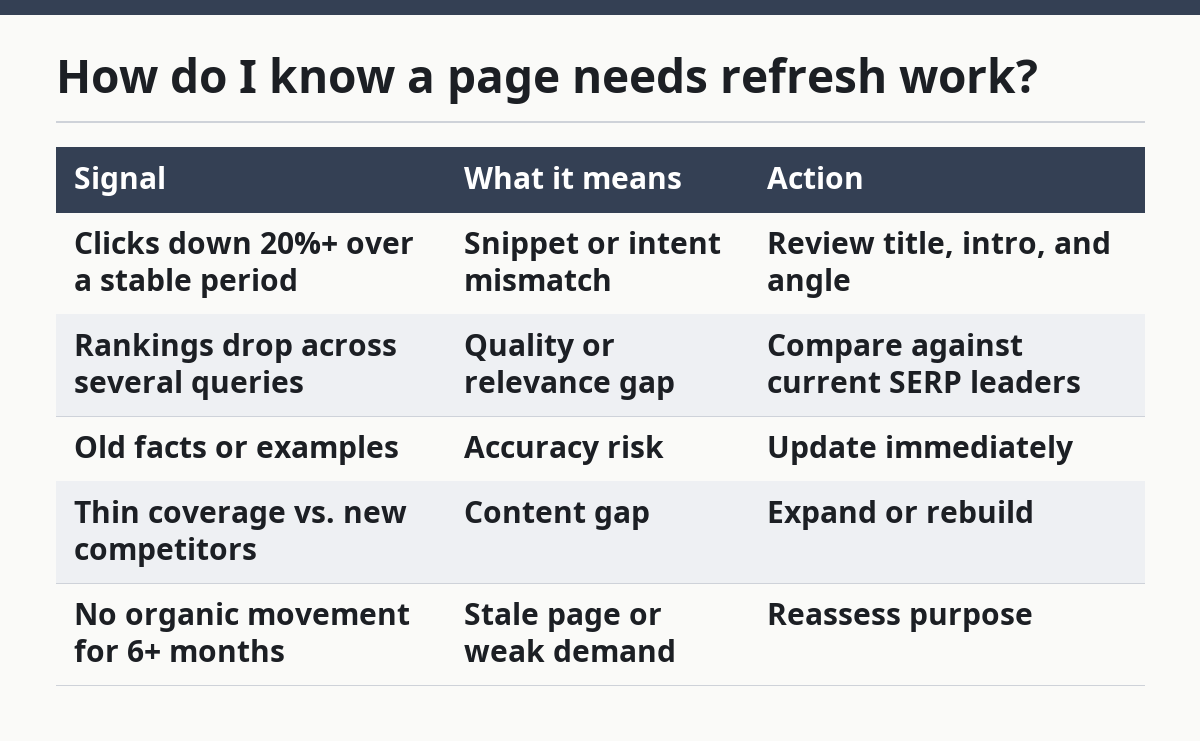
A practical audit can start with a simple scorecard:
| Signal | What it means | Action |
|---|---|---|
| Clicks down 20%+ over a stable period | Snippet or intent mismatch | Review title, intro, and angle |
| Rankings drop across several queries | Quality or relevance gap | Compare against current SERP leaders |
| Old facts or examples | Accuracy risk | Update immediately |
| Thin coverage vs. new competitors | Content gap | Expand or rebuild |
| No organic movement for 6+ months | Stale page or weak demand | Reassess purpose |
Use the numbers that matter to your site. A news page and a software guide will not decay on the same timeline. In AI content decay and refresh systems, the point is to watch for drift before the page becomes harder to rescue.
What should a refresh system track?
A refresh system should track signals from search, the page itself, and the market around it. The best version is boring in the right way: clear rules, fixed review dates, and no guessing.
Picture this: you own 200 AI pages and cannot read them all each month. You need a queue that shows which pages are slipping, which are stable, and which are not worth saving. That is a system, not a folder full of drafts.
Track these inputs:
-
Search data
Impressions, clicks, CTR, average position, and query drift in Google Search Console. -
Page quality signals
Outdated references, broken links, thin sections, duplicated intros, and stale screenshots. -
SERP changes
Are the top results now listicles, tool roundups, tutorials, or definitions? If the format changed, your page may need a new shape. -
Business relevance
Is the page still tied to a live offer, a service, or an audience need? A decayed page that no longer supports revenue may not deserve heavy work. -
AI-specific risks
Hallucinated claims, generic phrasing, and duplicated patterns from other AI drafts can create a second layer of decay.
A simple refresh queue can look like this:
- Green: Stable page, review every 6 to 12 months
- Yellow: Minor drift, refresh within 30 to 90 days
- Orange: Clear drop or outdated facts, refresh now
- Red: Wrong intent, merged topic, or no demand, retire or merge
Use this queue as a starting point rather than a rulebook carved in stone. A spreadsheet and a consistent review cycle can do most of the work, and that is often enough to keep AI content decay and refresh systems running without extra tooling.
What does a good refresh workflow look like?
A good refresh workflow starts with triage, then moves through diagnosis, rewrite, QA, and release. The page should not be rewritten just because it feels old.
Picture this: a page is underperforming, but you do not know if the issue is the headline, the structure, or the topic itself. If you jump straight to rewriting, you may spend 4 hours fixing the wrong thing. Workflow prevents that waste.
Use this sequence:
1) Triage the page
Decide whether the page is worth saving. If the topic has no demand or no business use, do not force a refresh.
2) Diagnose the cause
Ask what changed: search intent, SERP format, facts, competitors, internal linking, or page depth.
3) Choose the right action
Pick one of four actions: light refresh, moderate update, rebuild, or retire/merge.
4) Rewrite with a purpose
Fix the weak sections, not just the date stamp. If the intro is vague, rewrite it. If the core answer is thin, expand it.
5) Check for AI residue
Remove repetitive phrasing, generic filler, and claims that sound smooth but say little.
6) Re-verify the page
Check dates, screenshots, links, schema, and headings before publishing.
A simple rule helps here: if the main answer changed, the refresh should change the body, not just the metadata. That is the central discipline in AI content decay and refresh systems, because the work has to follow the problem, not the other way around.
When is a light refresh enough?
A light refresh is enough when the page is still right, but parts of it need cleanup. In those cases, the structure works and the search intent has not shifted much.
Picture this: the page still ranks on page 1, but two examples are outdated and the title misses a better keyword variation. That is not a rebuild. It is a focused repair.
Light refresh work usually includes:
- Updating dates, screenshots, or product names
- Tightening the title and meta description
- Reworking the first 100 words
- Adding one or two new sections
- Removing obsolete lines or broken links
- Adjusting internal links
This is the right move when the page still answers the query and the SERP shape has stayed mostly the same. It also works when the content is accurate but not competitive enough. In AI content decay and refresh systems, this is the low-cost option that preserves what already works.
A light refresh is not enough when:
- The article answers the wrong question
- The page has no unique angle
- The topic has exploded with new subtopics
- Competitors now cover the subject in far more depth
Think of light refreshes as maintenance. Big mistake if you treat them like rebuilds. If the page is structurally off, a quick polish will not fix the underlying mismatch.
When should a page be rebuilt, merged, or retired?
A page should be rebuilt, merged, or retired when the problem is structural, not cosmetic. If the query has changed, the page needs a new job.
Picture this: you have three short articles that all target the same broad AI topic. None wins alone, and each one cannibalizes the others. Refreshing each page separately can make the mess worse.
Use this decision logic:
- Rebuild when the topic is still valuable, but the current page is too shallow, too outdated, or too far from the current SERP pattern.
- Merge when two or more pages overlap heavily and one stronger page can carry the combined intent.
- Retire or noindex when the topic has little value, no traffic, or persistent mismatch with what searchers want.
Rebuilds are common for AI topics because the field shifts fast. A page about prompt tools, model comparisons, or workflow automation can become stale in under a year if the product lineup changes. For that reason, AI content decay and refresh systems should assume that some pages will need major surgery, not just edits.
Merges matter when several pages chase the same intent. Duplicate coverage can split links, dilute signals, and confuse the crawler.
Retirement is not failure. It is a cleanup decision. If a page gets no meaningful traffic and no longer supports the site’s purpose, keeping it live can create drag.
The best refresh system makes that call early. It does not force every URL to survive.
How can AI help without making the page worse?
AI can help by finding decay patterns faster, drafting update notes, and comparing old and new page versions. It becomes a problem when it starts writing vague text that sounds current but says nothing new.
Picture this: you feed a model a set of underperforming pages and ask it to “improve SEO.” It gives you polished filler, extra synonyms, and a generic intro. That is not refresh work. That is surface noise.
Use AI for:
- Pattern detection across many pages
- Drafting change logs
- Summarizing SERP differences
- Flagging stale references
- Generating outline options for a human editor
Do not use AI as the final judge for:
- Search intent fit
- Factual accuracy
- Brand voice
- Legal, medical, or financial sensitivity
- Whether a page should exist at all
The best practice is human-in-the-loop editing. The model spots the mess; the editor makes the call.
Google’s Search Central guidance on helpful, people-first content and the Content Marketing Institute’s editorial planning guidance are both useful references when you build AI content decay and refresh systems. Those sources are not magic answers, but they help keep the process grounded in quality and workflow rather than quick fixes.
How often should you refresh AI pages?
You should refresh AI pages on a schedule that matches topic volatility, not on a fixed vanity calendar. A page about fast-moving tools needs a much tighter review rhythm than a timeless explainer.
Picture this: one article covers a tool release cycle, another covers a general concept like prompt structure. The first may need a review every 1 to 3 months; the second may hold longer if the facts stay stable.
A practical schedule looks like this:
- High-volatility topics: review monthly or after major product releases
- Mid-volatility topics: review every quarter
- Low-volatility topics: review twice a year
- Evergreen pages: review annually, or sooner if performance drops
The schedule matters less than consistency. A page that is reviewed every quarter with clear rules will outperform one that is “updated” whenever someone remembers it.
Set triggers too:
- A visible ranking drop
- A core update
- A new competitor entering page 1
- A change in product features or policies
- A rise in impressions for a query the page does not fully satisfy
That mix of calendar and trigger-based review is the cleanest model. It stops both over-refreshing and neglect. It also gives AI content decay and refresh systems a predictable operating rhythm.
What does a strong refresh system look like in practice?
A strong refresh system turns decay into a routine process instead of a panic response. It has thresholds, owners, and a clear way to decide what happens next.
Picture this: your team has 120 AI pages, three editors, and a backlog that keeps growing. Without a system, every update becomes a debate. With a system, the page either gets a light refresh, a rebuild, a merge, or a retirement decision.
A workable setup includes:
- Ownership: one person owns the queue
- Triggers: ranking, CTR, freshness, and intent drift
- Review cadence: monthly, quarterly, or annual by topic type
- Decision rules: what counts as a light update vs. a rebuild
- QA checklist: fact checks, link checks, and snippet review
- Outcome tracking: record whether the refresh helped
You can even score each page on four dimensions:
- Traffic potential
- Freshness risk
- Intent fit
- Business value
Pages with high value and high decay risk get first priority. Pages with low value and low traffic get cut loose.
The truth is, the best refresh system is not glamorous. It is a habit. It makes stale pages visible, assigns the right kind of work, and keeps you from mistaking motion for improvement.
FAQ
How do I know if AI content is decaying or just underperforming?
AI content is decaying when it no longer matches the current query, SERP format, or facts around the topic. It is just underperforming when the page is still relevant but needs better structure, better title work, or stronger coverage. If rankings and clicks fall together, check for both decay and presentation problems.
Should I update the publish date when I refresh a page?
Only if the page really changed in a meaningful way. A date swap without real updates can make the page look newer than it is, and that hurts trust if readers notice old examples or stale sections. If the body changed in a real way, the date can reflect that change.
How much of a page should change during a refresh?
That depends on the diagnosis. A light refresh might change the intro, title, and a few sections, while a rebuild can replace most of the article. If the main answer is still sound, small edits may be enough; if the intent changed, the page needs deeper surgery.
Can I use AI to refresh old posts faster?
Yes, but only as a first pass. AI is useful for spotting stale phrasing, suggesting new sections, and summarizing what changed in the SERP. It should not be the final editor, because it can miss intent shifts, invent details, or smooth over weak reasoning.
What is the biggest mistake teams make with refresh systems?
The biggest mistake is treating every drop like a content problem. Sometimes the page is fine and the keyword has changed, the search result has shifted, or the topic no longer deserves the same effort. A good system tells you when to update, and when to stop forcing a page to work.
Drafted with AI; not yet reviewed by a person.