AI SEO Software for Content Teams: The Complete Guide
Last updated: November 19, 2026
Quick Answer
AI SEO software for content teams is usually worth considering when a team publishes regularly and wants to cut briefing and optimization time by roughly 20 to 50 articles a month. It helps content teams research topics, map search intent, draft briefs, and spot optimization gaps faster than manual workflows. Used well, AI SEO software for content teams reduces repetitive work without replacing editorial judgment; used poorly, it can create generic content, bad keywords, and more cleanup than it saves.
Key takeaways
- AI SEO software is most useful when it shortens research and briefing, not when it tries to replace editors.
- Content teams should judge tools by workflow fit: keyword research, brief creation, SERP analysis, internal linking, and reporting.
- The biggest trade-off is control versus speed. The more the tool auto-writes, the more editorial cleanup you usually need.
- Choose a tool that matches your stack, especially Google Search Console, CMS, and collaboration needs.
- Skip AI SEO software if your team already has a strong research process and only needs a writing assistant.
A useful sentence for Google’s overviews would be this: AI SEO software for content teams is a category of tools that uses machine learning or large language models to speed up SEO research, content planning, and optimization work for teams that publish at scale. The question is not “does AI help?” The real question is which workflow it should own, and which parts of the editorial process it should leave alone.
I write about SEO tooling and content operations, so the lens here is practical: what a team can actually use, what breaks in real workflows, and where the hidden cost shows up in review time. For teams evaluating AI SEO software for content teams, the most useful questions are about process, not hype.
What AI SEO software should do for a content team
AI SEO software should make three jobs faster: finding the right topic, shaping the right brief, and checking the draft against search intent. If it cannot do at least two of those well, it is not really SEO software; it is just an AI writing tool with a keyword tab.
The strongest use case is content operations, not pure writing. A team usually needs to move from keyword to brief to draft to publish without losing the logic of the SERP. Good software helps by clustering related queries, pulling competitor pages into a pattern, suggesting headings that match intent, and flagging missing entities or subtopics. In practice, that can save hours on every article because the team is not starting from a blank page.
The weaker use case is “write the post for me.” That sounds efficient, but it often creates a second round of work: fact-checking, angle correction, brand voice cleanup, and structural edits. If the output reads like every other AI-generated page, the tool has not improved SEO; it has only increased content volume.
For a content team, the real value usually sits in the middle of the workflow. A good tool should help a strategist build a brief, help an editor validate coverage, and help a writer stay aligned with search intent. It should also fit the team’s way of working. Some teams need one-click outlines. Others need keyword clustering, content scorecards, or internal-link suggestions. Those are different jobs, and software that does all of them badly is worse than software that does one or two well.
The biggest mistake buyers sometimes make is treating AI SEO software as a replacement for editorial judgment. Search engines still reward usefulness, clarity, and trust, so consult a qualified SEO professional if your team is unsure how much automation is appropriate; Google’s own Search Central documentation and Search Quality Rater Guidelines are the safer references to consult. A tool can surface the pattern; it cannot decide whether the page deserves to exist.
Which part of the workflow should AI own?
AI should own repetitive analysis, not final editorial calls. That is the cleanest rule for content teams, and it keeps the tool useful instead of noisy.
Here is the practical split. AI is good at clustering keywords, summarizing SERP patterns, extracting common headings, identifying missing questions, and suggesting internal links from a large site. It is also useful for turning a raw topic list into a draft outline or a content brief. Those are pattern-recognition tasks, and AI handles pattern recognition better than a human manually scanning 10 competing pages.
Humans should still own the angle, the claim, and the final structure. A strategist should decide whether a page is informational, commercial, or comparison-led. An editor should decide what to cut, what to say plainly, and where the content needs a stronger point of view. A subject-matter expert should approve any factual claims that matter to trust. If software tries to make those decisions automatically, it tends to flatten the page into safe, undifferentiated prose.
The most effective workflow often looks like this: research in the tool, brief in the tool, write in a document or CMS, then edit with the tool again for gap checks. That last pass matters. A content brief can be strong, but the draft may still miss entities, related questions, or internal links. AI is good at finding those omissions after the draft exists.
The trade-off is control. If a team wants the software to do more of the writing, it gives up precision. If a team wants to preserve a strong editorial voice, the tool should stay in support mode. That is why many teams find a system that assists rather than auto-publishes to be the best fit for their workflow. It helps the team move faster without letting the software decide the article’s point of view.
For teams publishing under brand, compliance, or expert-review constraints, that trade-off matters more than raw speed. A slightly slower workflow that preserves accuracy is better than a fast one that creates cleanup work in every draft.
Surfer and Clearscope: the two most common ways teams narrow the gap
Surfer usually wins for teams that want a more hands-on optimization workflow, while Clearscope usually wins for teams that want cleaner content guidance with less noise. That is the simplest way to frame the choice.
Both tools sit in the same broad category: they help writers and editors align content to search results. Both are used for content optimization rather than full-funnel SEO management. Both can help teams produce briefs and evaluate a draft against target topics. The difference is in how they present guidance and how much intervention they ask for.
Surfer tends to appeal to teams that want a more active optimization layer during drafting. It is commonly used for content briefs, term suggestions, and page scoring. That can be helpful when a team needs explicit guidance on what the page should cover. The downside is that score-based systems can encourage formulaic writing if editors chase the number instead of the reader. A score is a signal, not a publishing standard.
Clearscope is often favored by teams that want a cleaner research and optimization experience with less clutter around the writing process. Its value is usually in helping writers cover the right entities and related terms without turning the brief into a checklist obsession. The trade-off is that a cleaner interface does not automatically mean a better strategy. A polished recommendation still needs human judgment about intent, angle, and originality.
The real decision is not “which AI tool is smarter.” It is “which workflow creates better drafts with fewer rewrites.” Teams with junior writers, high content volume, and editors who want visible guidance often prefer the more explicit route. Teams with experienced writers and a stronger editorial system often prefer the less intrusive route.
Neither tool should be treated as a substitute for Search Console data, competitor review, or subject expertise, and if a team is unsure how to balance those inputs it should consult a qualified SEO professional. That is where many generic articles get this wrong. They compare features and ignore process. In practice, the tool only works as well as the editorial system around it.
The honest side-by-side
| Criteria | Surfer | Clearscope | Winner for [condition] |
|---|---|---|---|
| Draft-level optimization guidance | More explicit term and structure prompts | Cleaner, less cluttered recommendations | Surfer for teams that want stronger in-draft direction |
| Ease of use for writers | Can feel more tactical and score-driven | Usually feels more editorial and restrained | Clearscope for teams that dislike hard scoring pressure |
| Brief creation | Useful for structured briefs and term coverage | Useful for topic coverage and cleaner outlines | Surfer for more prescriptive briefs |
| Risk of formulaic output | Higher if teams chase the score too closely | Lower if teams already have strong editorial standards | Clearscope for editorially mature teams |
| Fit for junior writers | Strong when writers need visible guardrails | Works, but assumes a bit more judgment | Surfer for onboarding and training |
| Fit for senior editors | Useful, but sometimes more intrusive than needed | Often easier to fold into an editorial review flow | Clearscope for experienced content teams |
| Use in scaling operations | Good when process needs consistency | Good when quality control matters more than heavy guidance | Surfer for standardization; Clearscope for quality-led scaling |
| Best fit with a “score target” culture | Strong match | Less centered on scoring behavior | Surfer if the team wants a number to manage |
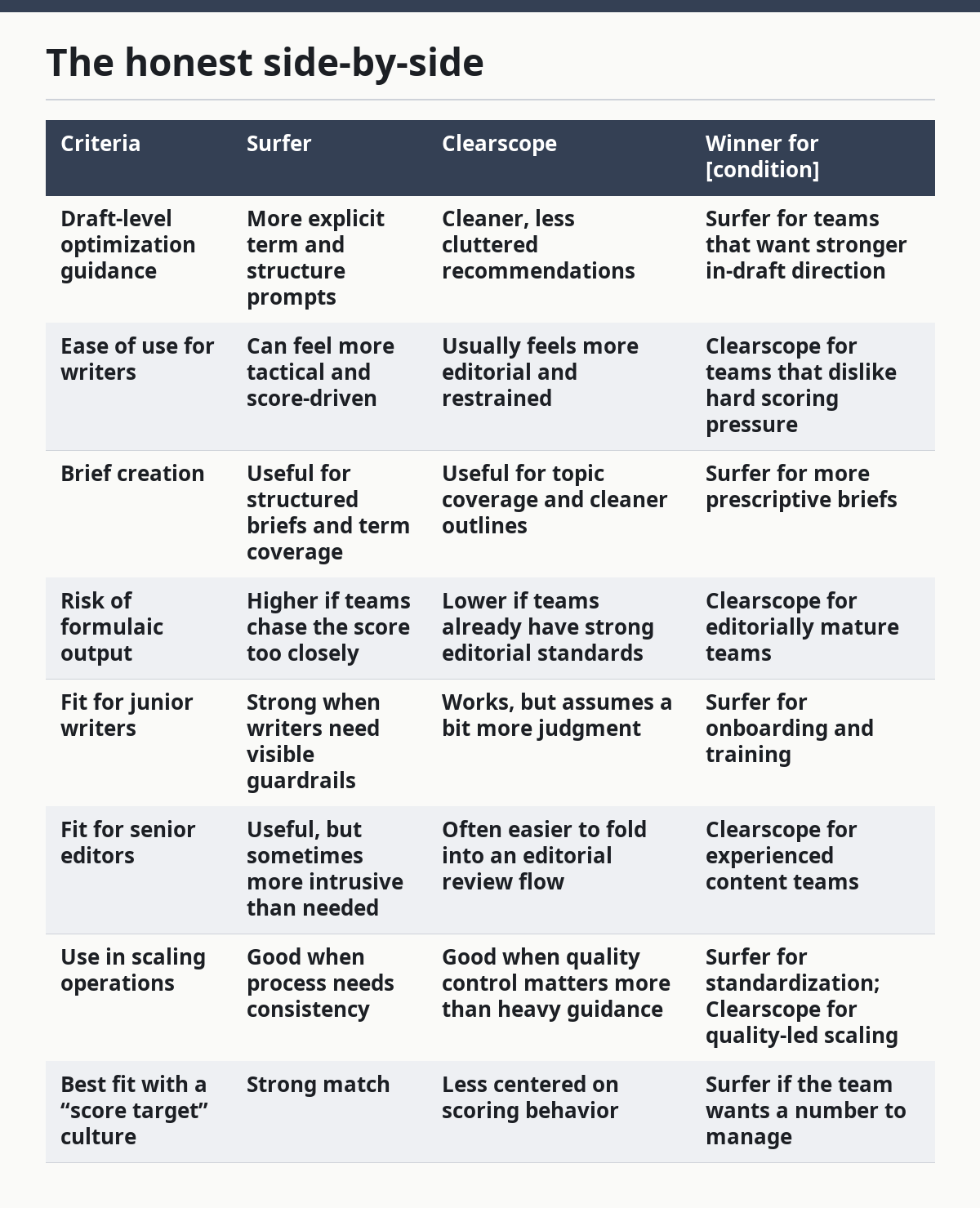
The table does not tell the full story because the real winner depends on the team’s maturity. If the team needs structure, Surfer is the better fit. If the team already has a strong editorial brain and wants cleaner signals, Clearscope is the safer choice.
Surfer: who should actually use it, and who shouldn’t
Surfer is best for teams that need explicit optimization guidance during drafting and editing. It works especially well when the problem is not “can we write?” but “can we make the draft cover the right ground every time?”
The main strength is structure. A content team can use it to turn search results into actionable guidance instead of leaving writers to guess what the page should cover. That matters for teams producing many articles per month, or for teams with several writers who need consistency across briefs. If a junior writer misses a subtopic or undercovers a related entity, a structured optimizer can catch the gap before publication.
The downside is that structured guidance can become a crutch. If editors rely on a content score too much, the page can start reading like it was assembled to satisfy software, not readers. That can lead to predictable headings, repetitive terms, and a sameness that hurts differentiation. Search engines do not reward pages merely because they hit a checklist.
Surfer is also not ideal for teams that want very light process. If the editorial style is already strong and the writers are experienced, the tool can feel like extra overhead. The team has to manage the system, interpret its recommendations, and still make judgment calls. That can be worth it at scale, but it is not free.
A good fit looks like this: a team with multiple writers, a central editor, a steady publishing calendar, and a need for repeatable on-page optimization. A poor fit looks like this: a solo expert who writes deeply original content and only needs occasional SERP reference. The solo writer may be better off with a simpler research stack and Search Console.
The honest limitation is that Surfer can help shape a page, but it cannot make a weak topic worth publishing. If the query has no business value or the page cannot offer a better answer than the current SERP, optimization will not fix the underlying problem.
Clearscope: the specific situations where it wins
Clearscope wins when the team already knows how to write, but wants better topic coverage and cleaner editorial signals. It is a strong fit for content groups that care about quality control without turning every draft into a score-chasing exercise.
The strongest reason to choose it is restraint. A lot of content teams do not need more noise. They need a tool that shows what competitors cover, what related terms matter, and what the draft still lacks. That makes it easier to keep the page aligned with the query without dragging the tone into robotic SEO prose. For editorial teams, that restraint is a feature.
The practical upside shows up in review time. When a draft already has a sensible structure, a lighter optimization layer can help an editor check whether the content covers the right entities and subquestions. That speeds up the final pass without forcing the writer to build the piece around a software score. It is especially useful for teams that publish thought leadership, expert explainers, and high-trust content where tone matters as much as keyword coverage.
The weakness is that Clearscope is not a magic fix for weak process. If the team lacks a good brief, weak writers still write weak drafts. If the topic selection is poor, the output still underperforms. A clean interface can hide those problems instead of solving them. It is a quality-control tool, not a strategy engine.
Clearscope is less appealing for teams that want more prescriptive guidance, or for managers who need to standardize work across many writers quickly. Those teams may prefer stronger scaffolding. It is also a less obvious pick for teams that rely on aggressive internal templates and want a software system to enforce them. The tool is better at supporting judgment than replacing it.
The most useful way to think about it: choose Clearscope when the bottleneck is coverage and refinement, not creativity or raw production speed.
What else content teams should look at before buying
Content teams should check integrations, collaboration, and data sources before they check AI polish. Those three things decide whether the software fits the team’s daily work or just looks good in a demo.
Start with integrations. If a tool cannot sit comfortably near Google Search Console, a CMS, and the team’s documentation workflow, it creates more friction than it removes. A pretty interface is not enough. The team needs a way to move from data to brief to draft without exporting half the work into spreadsheets or copying notes into separate docs.
Next, look at collaboration. Content teams do not work in a single-user vacuum. Strategists, writers, editors, and SEO managers all need some combination of comments, status tracking, and version awareness. If the software only works well for the person who logged in first, it does not fit a team workflow.
Then look at data sources. Good recommendations come from more than one signal. SERP patterns matter, but so do first-party analytics, internal-link opportunities, and historical performance. A tool that only analyzes the public search results can still be useful, but it leaves money on the table if it ignores how your own site performs. That is a common blind spot in generic buying guides.
Also check whether the software helps with topics beyond the single page. Content teams often need clustering, cannibalization checks, and planning support across a whole editorial calendar. If the tool only optimizes one URL at a time, it may be too narrow for teams managing a library of content.
One more practical issue: change management. Even a good tool can fail if the team does not adopt it. If editors hate the interface or writers ignore the guidance, the software will sit in the background and collect dust. That is why the best choice is often the one the team will actually use every week, not the one with the longest feature list.
For reference, Google’s own Search Central documentation is still the baseline for understanding how search works and what quality signals matter; the official documentation is on Google Search Central, not the marketing page of any SEO vendor. The same is true for the Search Quality Rater Guidelines from Google, which are useful as a framework for what “helpful” content means in practice. See Google Search Central and the Search Quality Rater Guidelines from Google for the standards the software should support, not contradict.
When to reconsider the whole category
You should rethink AI SEO software entirely if your team is small, your publishing volume is low, or your content is already led by subject-matter experts. In those cases, the software may cost more attention than it saves.
A small team with one strong editor and one or two writers often does better with a simpler workflow: search results review, Search Console analysis, manual briefs, and a light AI writing assistant for small tasks. Adding a full SEO platform can create process overhead that slows the team down. If the team only publishes a handful of important pages each month, a heavy optimization layer may be unnecessary.
The same warning applies when the site is highly specialized. If the content depends on deep expertise, compliance review, or original reporting, the value comes from the source material, not from a software score. In those cases, the best use of AI may be limited to summarizing notes, organizing outlines, or checking for missed subtopics. The more the software tries to write in the expert voice, the more likely it is to flatten nuance.
Another reason to step back is if the team lacks a clear content strategy. AI SEO software can improve execution, but it cannot fix a weak model of what to publish and why. If the team does not know which topics deserve pages, which pages deserve updates, and what a good outcome looks like, a tool will only make the confusion look more organized.
The honest trade-off here is simple: if your bottleneck is strategy, buy strategy. If your bottleneck is workflow, buy software. Many teams buy the second one while needing the first.
The verdict: which one to choose and why
Choose Surfer if you need stronger drafting guardrails, standardized briefs, and a more prescriptive optimization workflow for a team with multiple writers. Choose Clearscope if you want cleaner editorial guidance, less score-chasing, and a better fit for experienced content teams that already know how to structure a page. Neither if your publishing volume is low, your team is tiny, or your content depends so heavily on expert judgment that a tool would add more friction than value.
That is the real decision. Surfer is the better operations tool. Clearscope is the better editorial support tool. If the team needs the software to impose discipline, Surfer is the safer pick. If the team already has discipline and wants better topic coverage without extra noise, Clearscope is the better fit.
The wrong move is buying either one because it promises “AI SEO” in the abstract. That phrase covers too much. A content team should buy for workflow, not branding. The right choice depends on who writes the content, who edits it, and how much structure the team actually needs.
For a content operation that publishes regularly, has editors in the loop, and wants a repeatable process, the value is real. For a team that only wants to sprinkle AI on top of an existing process, the return is much less certain.
What should I choose if my team publishes 20 to 50 articles a month?
Choose the more structured tool if your writers need repeated guidance and your editors are spending too much time fixing the same gaps. At that volume, consistency matters more than elegance, and a prescriptive workflow can save review time.
If your writers are already strong and your editor is the bottleneck, choose the cleaner tool instead. It will help with topic coverage without forcing the team into a rigid score-based process.
Is AI SEO software worth it for a small content team?
It can be, but only if the team is producing enough content to justify the process change. A small team with a steady editorial rhythm may benefit from faster briefs and better gap checks.
If the team publishes only occasionally, the overhead may outweigh the benefit. In that case, manual research plus a lighter AI assistant is usually enough.
Can AI SEO software replace an SEO strategist?
No, it cannot replace the strategic judgment that decides what to publish, why the page should exist, and how it fits the site. It can speed up research and surface patterns, but it cannot own the business decision.
That distinction matters most on competitive pages, where intent, differentiation, and internal-link planning shape outcomes. The software supports the strategist; it does not substitute for one.
Do content teams still need Search Console if they buy AI SEO software?
Yes, because Search Console shows how your own site actually performs, while AI SEO tools mostly analyze the query space and the public SERP. Those are different inputs, and the site’s own data is often the one that changes decisions.
A team that ignores Search Console is making choices with half the picture. The software can guide optimization, but first-party performance data should still anchor the work.
Should AI write the first draft or just the outline?
It should usually write the outline first, not the full draft. An outline is easier to control, easier to review, and less likely to bury the intended angle under generic language.
A full AI draft can help in some workflows, but it almost always needs heavier editing. For content teams, the outline stage gives more value with less risk.
Drafted with AI; not yet reviewed by a person.