How to Check Whether a Page Is Indexed, Crawlable
Last updated: November 19, 2026
Key Takeaways
- Start with a quick 10-second check before digging through logs, tags, or scripts.
- A page is indexed when the search engine stores it and can return it for queries.
- Yes — JavaScript can make a page fetchable but still hard to understand, which can hurt indexing and AI search eligibility.
- A page is eligible for AI search tools when discovery, fetching, rendering, and use all work without conflicting signals.
A page can be indexed, crawlable, and still not ready for AI search if the signals are mixed.
This guide on how to check whether a page is indexed, crawlable, and eligible for AI search shows you how to check index coverage, crawl access, and AI search eligibility without guessing.
It also settles the part most checks miss: whether the page is blocked, canonicalized away, or hard to render.
Start with the fastest yes-or-no check
Picture this: you have one URL and a nagging question — is it in the index, or is Google only pretending to know it exists? Start here with a quick yes-or-no check, because a 10-second check can save you from digging through logs, tags, and scripts you may not need.
The quickest check is a site search or URL inspection check in Google Search Console, plus a look in Bing Webmaster Tools if Bing matters to you. If the page is missing from the index, or marked as excluded, you already know the next layer to inspect. If it’s indexed, the page may still have crawl or rendering problems.
-
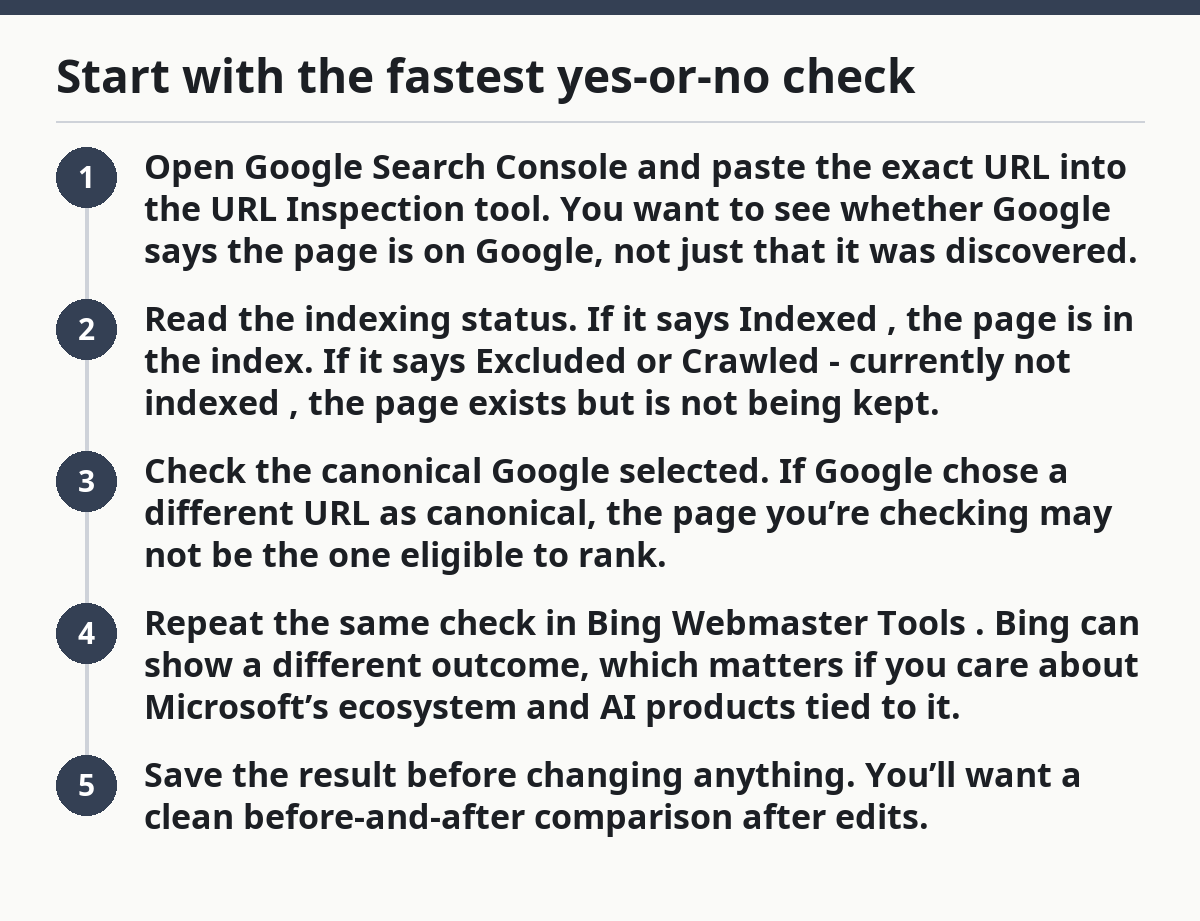
Open Google Search Console and paste the exact URL into the URL Inspection tool.
You want to see whether Google says the page is on Google, not just that it was discovered. -
Read the indexing status.
If it says Indexed, the page is in the index. If it says Excluded or Crawled – currently not indexed, the page exists but is not being kept. -
Check the canonical Google selected.
If Google chose a different URL as canonical, the page you’re checking may not be the one eligible to rank. -
Repeat the same check in Bing Webmaster Tools.
Bing can show a different outcome, which matters if you care about Microsoft’s ecosystem and AI products tied to it. -
Save the result before changing anything.
You’ll want a clean before-and-after comparison after edits.
This first pass tells you where the problem lives.
Not every issue is a robots problem.
How do I check if a page is indexed?
A page is indexed if the search engine has stored it in its search index and can return it for queries. That sounds simple, but the real check is whether the engine recognizes the exact URL you mean, not just some version of it with tracking parameters or a different canonical.
Use three checks, in this order:
- Google Search Console URL Inspection: the most direct answer for Google.
- Bing Webmaster Tools URL submission / inspection: the direct answer for Bing.
- A live search query using the exact URL or a unique sentence from the page: a quick reality check, not a replacement for console data.
If Search Console says URL is on Google, that is the strongest sign the page is indexed there. If it says URL is not on Google, the page may still be crawlable, but it has not been kept in the index. Those are different problems.
Watch for these details in the report:
If you are unsure how to interpret them, consult a qualified SEO or technical specialist, and use Google’s documentation as a source of truth.
- Canonical URL: if Google picked another page, your page may be treated as a duplicate.
- Last crawl: a crawl date can be recent even when the page is not indexed.
- Coverage status: “Excluded” often points to noindex, duplicate selection, or soft blockage.
A page can be indexed and still perform badly.
Indexed is not the same as trusted, prominent, or likely to be cited.
Check crawl access before you chase content quality
Picture this: the page looks fine in your browser, but a bot hits a wall at the first file. That usually means the problem is crawl access, not writing quality, and the fix lives in the headers, robots file, or page code.
Crawl access means the bot can fetch the page and its main resources. For modern pages, that includes HTML, CSS, JavaScript, and sometimes images. If the bot can’t fetch the resources it needs, the page may render badly or not at all.
Check these in order:
- robots.txt: open
yourdomain.com/robots.txtand look for rules that block the URL path or important assets. - HTTP status code: the page should return 200 OK. A 3xx redirect, 4xx error, or 5xx server issue can break crawlability.
- Meta robots tag: look for
noindex,nofollow, or other directives in the<head>. - X-Robots-Tag header: some pages are blocked in headers, not in HTML.
- Canonical tag: a canonical pointing somewhere else can send signals away from the page you care about.
Common crawl blockers have real costs:
- Disallowed in robots.txt: the bot may not fetch the page at all.
- noindex tag: the page can be crawled but is not meant to stay indexed.
- Broken redirect chain: the bot may stop before the final page.
- Server errors: the bot may give up after repeated failures.
The fix is mechanical, not mysterious.
Confirm fetch, confirm headers, confirm directives.
What should I look for in robots.txt, noindex, and canonical tags?
Picture this: the page loads in your browser, yet the bot receives a different instruction set. That mismatch is where most indexing mistakes start, and it’s why you need to read the page like a crawler does.
The robots.txt file controls whether bots may request a URL path. A noindex tag controls whether a fetched page should stay out of the index. A canonical tag tells search engines which URL is the preferred version when duplicates exist. These three signals solve different problems.
Use this simple reading order:
-
robots.txt first
If the path is blocked, the bot may never see the page content. Check forDisallowlines that match the directory or file. -
meta robots second
Look fornoindex. A page withnoindexcan still be crawled, but it should not be indexed. -
canonical tag third
If the canonical points to a different URL, the current page may be treated as a copy or alternate. If you are unsure whether that is appropriate, consult a qualified SEO or technical specialist and refer to Google Search Central documentation. -
Bing and Google reports last
Confirm what the engine actually did with those signals, since interpretation can differ.
A frequent trap is treating canonical like a blocking tool.
If you are unsure how to apply canonicals safely, consult a qualified SEO or technical specialist and use Google Search Central as a source.
Another trap is assuming a page with index,follow is safe.
If the canonical, server response, or internal links point elsewhere, the page can still lose eligibility.
Can JavaScript make a page crawlable but not indexable?
Yes — JavaScript can make a page fetchable but still hard to understand, which can hurt indexing and AI search eligibility. A bot may request the URL successfully and still miss content that only appears after scripts run or after user interaction.
This is where JavaScript rendering matters. If the main text, links, or canonical signals are injected late, the crawler may see an incomplete page. Search engines can render many pages, but rendering is not always perfect, instant, or cheap for the crawler.
Check these signs:
- The raw HTML has little or no visible body text.
- Important links appear only after clicking or scrolling.
- The title, meta description, or canonical is set by script instead of server-side HTML.
- The page depends on APIs that fail when JavaScript is off.
A good practical test is to view both the raw HTML and the rendered page. If the body text only exists in the rendered version, the page may be crawlable in theory but weak in practice.
Look at Google Search Console’s rendered HTML and the live inspection result.
If the rendered page is missing chunks of text, that is a problem you can see, not guess at.
On the other hand, a simple server-rendered page with plain HTML often gives bots fewer chances to miss something.
Plain usually wins.
What makes a page eligible for AI search tools?
A page is eligible for AI search tools when the tool can discover it, fetch it, render enough of it, and use it without hitting blockages or contradictory signals. Eligibility is not the same as being cited, and it is not the same as ranking well in classic search.
For this check, think in layers:
- Discoverable: the URL can be found from links, sitemaps, or search index data.
- Crawlable: the bot can request the page and its key resources.
- Renderable: the page content appears after scripts and styling load.
- Indexable: the page is allowed into the index and not overridden by
noindexor another canonical. - Machine-readable: headings, paragraphs, and links are clear enough for extraction.
If you want a simple rule, use this: a page that is blocked, broken, or hidden behind heavy script is a weak candidate for AI search. A page that is accessible, stable, and clearly structured is a stronger candidate.
That does not guarantee citation.
It only clears the gate.
A few details help here:
- Structured HTML gives bots cleaner text extraction.
- Stable canonical tags reduce duplicate confusion.
- Working internal links help discovery.
- Fast, consistent responses reduce crawl waste.
This is where many generic guides go wrong: they stop at “indexed or not.”
AI search eligibility is broader than index status alone.
What a clean diagnosis looks like in practice
Picture this: you’re staring at one URL, and the reports disagree. Search Console says one thing, Bing says another, and the browser shows a page that looks normal. A clean diagnosis means you line up the signals and decide which layer broke first.
Use this sequence:
- Step 1: Check index status in Google Search Console.
- Step 2: Check crawl access in robots.txt, response headers, and HTTP status.
- Step 3: Check page directives for noindex and canonical tags.
- Step 4: Check rendering by comparing raw HTML to rendered output.
- Step 5: Check Bing Webmaster Tools so you see whether the issue is Google-only or broader.
When the page is indexed but weak, the cause is often duplication, poor canonical choice, or thin rendered output. When the page is crawlable but not indexed, noindex, duplicate selection, or quality signals are more likely. When the page is not crawlable, robots rules, server errors, or broken scripts usually sit at the front of the line.
Keep the diagnosis narrow.
One broken layer at a time is easier to fix than a dozen guesses.
Common mistakes that waste time
A page can look healthy and still fail the simplest checks because people read the wrong signal. The cost is usually slow diagnosis, not mystery failure, and the fix is to stop treating every warning the same way.
The most common mistakes are these:
-
Checking only the browser
A browser is not a crawler. It can hide missing headers, noindex tags, and blocked resources. -
Confusing crawlable with indexed
A bot can fetch a page and still decline to keep it. -
Ignoring canonicals
If the selected canonical is different, your page may be the wrong URL in the index. -
Skipping JavaScript review
If the main content is script-dependent, the crawler may not get a clean page. -
Looking at one engine only
Google and Bing can behave differently, so one report is not the whole story.
The better move is to treat the page like a system, not a screenshot.
Search engines do.
The short checklist to use before you move on
A page is eligible for indexing and AI search only if the basic signals line up. That means the URL returns 200 OK, the page is not blocked by robots.txt, it does not carry a blocking noindex signal, the canonical tag points where it should, and the main content survives JavaScript rendering.
If you want the shortest workable checklist, use this:
- URL Inspection in Google Search Console
- Bing Webmaster Tools check
- robots.txt review
- meta robots and header review
- canonical tag review
- rendered-versus-raw HTML comparison
That’s enough to tell whether the page is indexed, crawlable, and a realistic candidate for AI search tools.
It won’t tell you whether the page will be cited. That is a different job.
FAQ
How do I check if a page is indexed?
The fastest check is Google Search Console’s URL Inspection tool. If it says the URL is on Google, the page is indexed there; if it says excluded or not on Google, it is not indexed in the way you want. A live search can help, but the console result is the stronger signal.
How do I know if bots can crawl my page?
The page is crawlable if bots can fetch it without being blocked by robots.txt, server errors, or blocking headers. Check the HTTP status code, the robots.txt file, and the meta robots tag. If the page loads only after heavy JavaScript, crawlability may be partial, not clean.
What makes a page eligible for AI search tools?
A page is eligible when it can be discovered, fetched, rendered, and read without blockages or conflicting directives. Clean HTML, a stable canonical tag, and accessible text all help. Eligibility does not guarantee citation, but it is the first gate AI search tools need to pass through.
Drafted with AI; not yet reviewed by a person.